Color
以 RGBA 格式表示的颜色。
描述
由红(r)、绿(g)、蓝(b)和 alpha(a)分量表示的 RGBA 格式的颜色。每个分量都是一个 32 位浮点值,通常介于 0.0 到 1.0 之间。某些属性(例如 CanvasItem.modulate)可能支持大于 1.0 的值,用于表示过亮或 HDR(High Dynamic Range,高动态范围)颜色。
创建颜色的方法有很多:可以使用 Color 的各种构造函数,from_hsv() 等静态方法,以及来自基于 X11 颜色名称的标准化颜色集合(外加 TRANSPARENT)的名称。
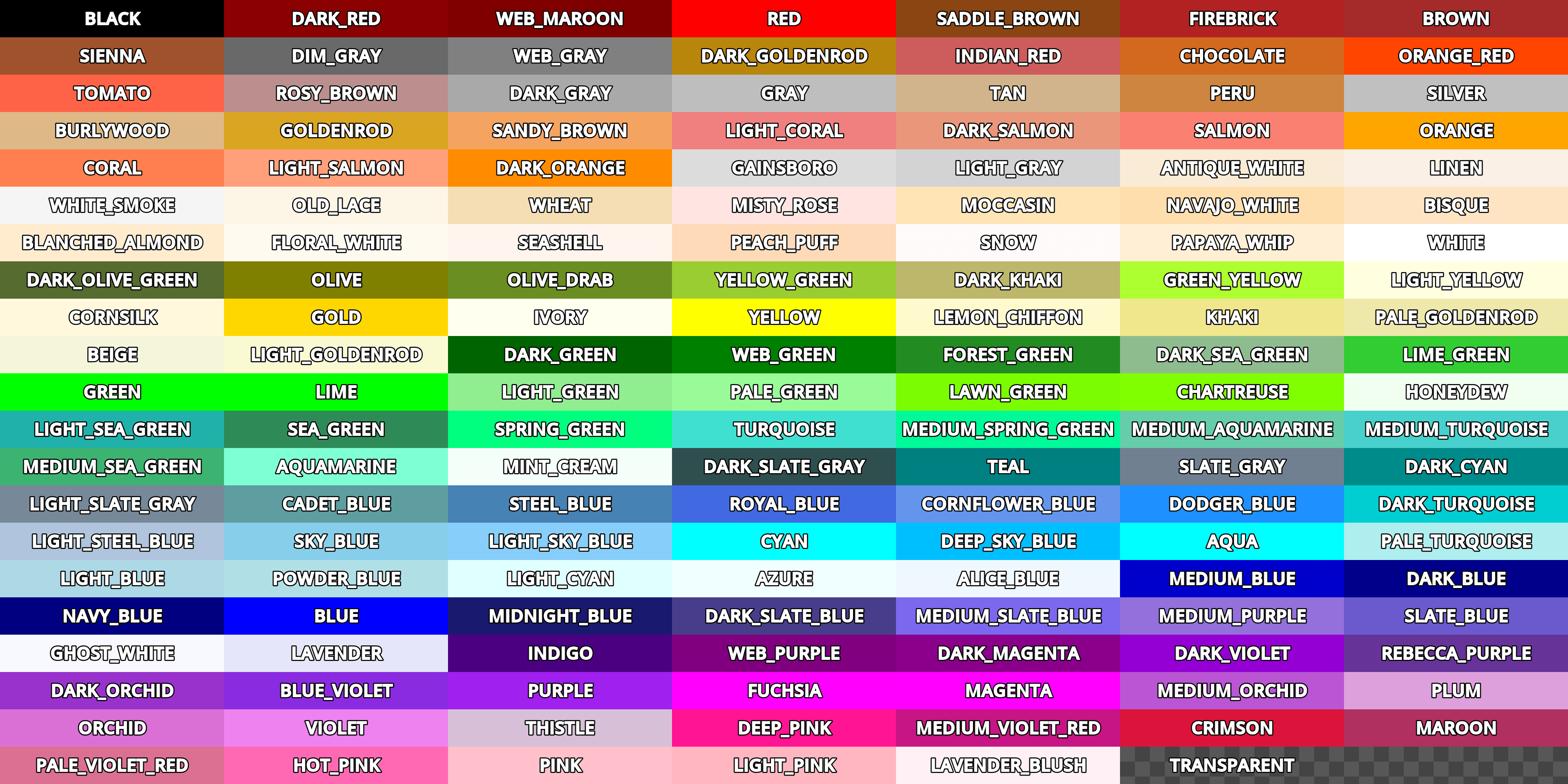
尽管 Color 可以用于存储任意编码的值,除非有特殊说明,Godot 会认为其中红(r)、绿(g)和蓝(b)的属性是由 nonlinear sRGB transfer function 编码的。这个色彩编码被大量传统的艺术和网络工具使用,使得 Godot 和这些工具之间的色彩容易保持一致。Godot 与 sRGB 标准同样使用 Rec. ITU-R BT.709 中的原色。
所有物理模拟,比如光照计算,以及色度变换,比如 get_luminance(),都必须在线性编码下进行运算才能得到正确结果。进行这些运算时,可以用 srgb_to_linear() 和 linear_to_srgb() 将 Color 在默认编码和线性编码之间转换。
注意:在布尔运算的上下文中,只有等于 Color(0, 0, 0, 1)(不透明黑色)的 Color 才会被求值为 false。其余情况下 Color 将始终被求值为 true。
备注
通过 C# 使用该 API 时会有显著不同,详见 C# API 与 GDScript 的差异。
教程
属性
|
||
|
||
|
||
|
||
|
||
|
||
|
||
|
||
|
||
|
||
|
||
|
||
|
||
|
构造函数
Color() |
|
方法
clamp(min: Color = Color(0, 0, 0, 0), max: Color = Color(1, 1, 1, 1)) const |
|
from_hsv(h: float, s: float, v: float, alpha: float = 1.0) static |
|
from_ok_hsl(h: float, s: float, l: float, alpha: float = 1.0) static |
|
from_rgba8(r8: int, g8: int, b8: int, a8: int = 255) static |
|
from_rgbe9995(rgbe: int) static |
|
from_string(str: String, default: Color) static |
|
get_luminance() const |
|
html_is_valid(color: String) static |
|
inverted() const |
|
is_equal_approx(to: Color) const |
|
linear_to_srgb() const |
|
srgb_to_linear() const |
|
to_abgr32() const |
|
to_abgr64() const |
|
to_argb32() const |
|
to_argb64() const |
|
to_rgba32() const |
|
to_rgba64() const |
运算符
operator !=(right: Color) |
|
operator *(right: Color) |
|
operator *(right: float) |
|
operator *(right: int) |
|
operator +(right: Color) |
|
operator -(right: Color) |
|
operator /(right: Color) |
|
operator /(right: float) |
|
operator /(right: int) |
|
operator ==(right: Color) |
|
operator [](index: int) |
|
常量
ALICE_BLUE = Color(0.9411765, 0.972549, 1, 1) 🔗
爱丽丝蓝。
ANTIQUE_WHITE = Color(0.98039216, 0.92156863, 0.84313726, 1) 🔗
古董白。
AQUA = Color(0, 1, 1, 1) 🔗
水色。
AQUAMARINE = Color(0.49803922, 1, 0.83137256, 1) 🔗
海蓝色。
AZURE = Color(0.9411765, 1, 1, 1) 🔗
天蓝色。
BEIGE = Color(0.9607843, 0.9607843, 0.8627451, 1) 🔗
米黄色。
BISQUE = Color(1, 0.89411765, 0.76862746, 1) 🔗
橘黄色。
BLACK = Color(0, 0, 0, 1) 🔗
黑色。在 GDScript 中,这是所有颜色的默认值。
BLANCHED_ALMOND = Color(1, 0.92156863, 0.8039216, 1) 🔗
杏仁白色。
BLUE = Color(0, 0, 1, 1) 🔗
蓝色。
BLUE_VIOLET = Color(0.5411765, 0.16862746, 0.8862745, 1) 🔗
蓝紫色的颜色。
BROWN = Color(0.64705884, 0.16470589, 0.16470589, 1) 🔗
棕色。
BURLYWOOD = Color(0.87058824, 0.72156864, 0.5294118, 1) 🔗
硬木色。
CADET_BLUE = Color(0.37254903, 0.61960787, 0.627451, 1) 🔗
军服蓝。
CHARTREUSE = Color(0.49803922, 1, 0, 1) 🔗
黄褐色。
CHOCOLATE = Color(0.8235294, 0.4117647, 0.11764706, 1) 🔗
巧克力色。
CORAL = Color(1, 0.49803922, 0.3137255, 1) 🔗
珊瑚色。
CORNFLOWER_BLUE = Color(0.39215687, 0.58431375, 0.92941177, 1) 🔗
矢车菊蓝色。
CORNSILK = Color(1, 0.972549, 0.8627451, 1) 🔗
玉米须色。
CRIMSON = Color(0.8627451, 0.078431375, 0.23529412, 1) 🔗
绯红的颜色。
CYAN = Color(0, 1, 1, 1) 🔗
青色。
DARK_BLUE = Color(0, 0, 0.54509807, 1) 🔗
深蓝色。
DARK_CYAN = Color(0, 0.54509807, 0.54509807, 1) 🔗
深青色。
DARK_GOLDENROD = Color(0.72156864, 0.5254902, 0.043137256, 1) 🔗
深色菊科植物的颜色。
DARK_GRAY = Color(0.6627451, 0.6627451, 0.6627451, 1) 🔗
深灰色。
DARK_GREEN = Color(0, 0.39215687, 0, 1) 🔗
深绿色。
DARK_KHAKI = Color(0.7411765, 0.7176471, 0.41960785, 1) 🔗
深卡其色。
DARK_MAGENTA = Color(0.54509807, 0, 0.54509807, 1) 🔗
深洋红色。
DARK_OLIVE_GREEN = Color(0.33333334, 0.41960785, 0.18431373, 1) 🔗
深橄榄绿色。
DARK_ORANGE = Color(1, 0.54901963, 0, 1) 🔗
深橙色。
DARK_ORCHID = Color(0.6, 0.19607843, 0.8, 1) 🔗
深色的兰花色。
DARK_RED = Color(0.54509807, 0, 0, 1) 🔗
深红色。
DARK_SALMON = Color(0.9137255, 0.5882353, 0.47843137, 1) 🔗
深鲑鱼色。
DARK_SEA_GREEN = Color(0.56078434, 0.7372549, 0.56078434, 1) 🔗
深海绿色。
DARK_SLATE_BLUE = Color(0.28235295, 0.23921569, 0.54509807, 1) 🔗
深板蓝的颜色。
DARK_SLATE_GRAY = Color(0.18431373, 0.30980393, 0.30980393, 1) 🔗
暗石板灰色。
DARK_TURQUOISE = Color(0, 0.80784315, 0.81960785, 1) 🔗
深绿松石色。
DARK_VIOLET = Color(0.5803922, 0, 0.827451, 1) 🔗
深紫罗兰色。
DEEP_PINK = Color(1, 0.078431375, 0.5764706, 1) 🔗
深粉色。
DEEP_SKY_BLUE = Color(0, 0.7490196, 1, 1) 🔗
深邃的天蓝色。
DIM_GRAY = Color(0.4117647, 0.4117647, 0.4117647, 1) 🔗
暗灰色。
DODGER_BLUE = Color(0.11764706, 0.5647059, 1, 1) 🔗
道奇蓝色。
FIREBRICK = Color(0.69803923, 0.13333334, 0.13333334, 1) 🔗
耐火砖红色。
FLORAL_WHITE = Color(1, 0.98039216, 0.9411765, 1) 🔗
花白色。
FOREST_GREEN = Color(0.13333334, 0.54509807, 0.13333334, 1) 🔗
森林绿色。
FUCHSIA = Color(1, 0, 1, 1) 🔗
洋红色。
GAINSBORO = Color(0.8627451, 0.8627451, 0.8627451, 1) 🔗
庚斯伯勒灰色。
GHOST_WHITE = Color(0.972549, 0.972549, 1, 1) 🔗
幽灵白颜色。
GOLD = Color(1, 0.84313726, 0, 1) 🔗
金色。
GOLDENROD = Color(0.85490197, 0.64705884, 0.1254902, 1) 🔗
金菊色。
GRAY = Color(0.74509805, 0.74509805, 0.74509805, 1) 🔗
灰色。
GREEN = Color(0, 1, 0, 1) 🔗
绿色。
GREEN_YELLOW = Color(0.6784314, 1, 0.18431373, 1) 🔗
绿黄色。
HONEYDEW = Color(0.9411765, 1, 0.9411765, 1) 🔗
蜜露色。
HOT_PINK = Color(1, 0.4117647, 0.7058824, 1) 🔗
亮粉色。
INDIAN_RED = Color(0.8039216, 0.36078432, 0.36078432, 1) 🔗
印度红色。
INDIGO = Color(0.29411766, 0, 0.50980395, 1) 🔗
靛青色。
IVORY = Color(1, 1, 0.9411765, 1) 🔗
象牙色。
KHAKI = Color(0.9411765, 0.9019608, 0.54901963, 1) 🔗
卡其色。
LAVENDER = Color(0.9019608, 0.9019608, 0.98039216, 1) 🔗
薰衣草色。
LAVENDER_BLUSH = Color(1, 0.9411765, 0.9607843, 1) 🔗
薰衣草紫红色。
LAWN_GREEN = Color(0.4862745, 0.9882353, 0, 1) 🔗
草坪绿色。
LEMON_CHIFFON = Color(1, 0.98039216, 0.8039216, 1) 🔗
柠檬雪纺色。
LIGHT_BLUE = Color(0.6784314, 0.84705883, 0.9019608, 1) 🔗
浅蓝色。
LIGHT_CORAL = Color(0.9411765, 0.5019608, 0.5019608, 1) 🔗
浅珊瑚色。
LIGHT_CYAN = Color(0.8784314, 1, 1, 1) 🔗
淡青色。
LIGHT_GOLDENROD = Color(0.98039216, 0.98039216, 0.8235294, 1) 🔗
亮金菊黄色。
LIGHT_GRAY = Color(0.827451, 0.827451, 0.827451, 1) 🔗
浅灰色。
LIGHT_GREEN = Color(0.5647059, 0.93333334, 0.5647059, 1) 🔗
浅绿色。
LIGHT_PINK = Color(1, 0.7137255, 0.75686276, 1) 🔗
浅粉色。
LIGHT_SALMON = Color(1, 0.627451, 0.47843137, 1) 🔗
浅鲑鱼色。
LIGHT_SEA_GREEN = Color(0.1254902, 0.69803923, 0.6666667, 1) 🔗
浅海绿色。
LIGHT_SKY_BLUE = Color(0.5294118, 0.80784315, 0.98039216, 1) 🔗
浅天蓝色。
LIGHT_SLATE_GRAY = Color(0.46666667, 0.53333336, 0.6, 1) 🔗
浅板岩灰色。
LIGHT_STEEL_BLUE = Color(0.6901961, 0.76862746, 0.87058824, 1) 🔗
浅钢蓝色。
LIGHT_YELLOW = Color(1, 1, 0.8784314, 1) 🔗
浅黄色。
LIME = Color(0, 1, 0, 1) 🔗
青柠色。
LIME_GREEN = Color(0.19607843, 0.8039216, 0.19607843, 1) 🔗
石灰绿色。
LINEN = Color(0.98039216, 0.9411765, 0.9019608, 1) 🔗
亚麻色。
MAGENTA = Color(1, 0, 1, 1) 🔗
洋红色。
MAROON = Color(0.6901961, 0.1882353, 0.3764706, 1) 🔗
栗色。
MEDIUM_AQUAMARINE = Color(0.4, 0.8039216, 0.6666667, 1) 🔗
中等海蓝宝石色。
MEDIUM_BLUE = Color(0, 0, 0.8039216, 1) 🔗
中蓝色。
MEDIUM_ORCHID = Color(0.7294118, 0.33333334, 0.827451, 1) 🔗
中等兰色。
MEDIUM_PURPLE = Color(0.5764706, 0.4392157, 0.85882354, 1) 🔗
中等紫色。
MEDIUM_SEA_GREEN = Color(0.23529412, 0.7019608, 0.44313726, 1) 🔗
中海绿色。
MEDIUM_SLATE_BLUE = Color(0.48235294, 0.40784314, 0.93333334, 1) 🔗
中等板岩蓝色。
MEDIUM_SPRING_GREEN = Color(0, 0.98039216, 0.6039216, 1) 🔗
中等春天绿色。
MEDIUM_TURQUOISE = Color(0.28235295, 0.81960785, 0.8, 1) 🔗
中等绿松石色。
MEDIUM_VIOLET_RED = Color(0.78039217, 0.08235294, 0.52156866, 1) 🔗
中等紫红色。
MIDNIGHT_BLUE = Color(0.09803922, 0.09803922, 0.4392157, 1) 🔗
午夜蓝色。
MINT_CREAM = Color(0.9607843, 1, 0.98039216, 1) 🔗
薄荷奶油色。
MISTY_ROSE = Color(1, 0.89411765, 0.88235295, 1) 🔗
朦胧的玫瑰色。
MOCCASIN = Color(1, 0.89411765, 0.70980394, 1) 🔗
鹿皮鞋颜色。
纳瓦白。
藏青色。
OLD_LACE = Color(0.99215686, 0.9607843, 0.9019608, 1) 🔗
旧蕾丝色。
OLIVE = Color(0.5019608, 0.5019608, 0, 1) 🔗
橄榄色。
OLIVE_DRAB = Color(0.41960785, 0.5568628, 0.13725491, 1) 🔗
暗淡橄榄色。
ORANGE = Color(1, 0.64705884, 0, 1) 🔗
橙色。
ORANGE_RED = Color(1, 0.27058825, 0, 1) 🔗
橘红色。
ORCHID = Color(0.85490197, 0.4392157, 0.8392157, 1) 🔗
兰花色。
PALE_GOLDENROD = Color(0.93333334, 0.9098039, 0.6666667, 1) 🔗
淡金色。
PALE_GREEN = Color(0.59607846, 0.9843137, 0.59607846, 1) 🔗
淡绿色。
PALE_TURQUOISE = Color(0.6862745, 0.93333334, 0.93333334, 1) 🔗
淡绿松石色。
PALE_VIOLET_RED = Color(0.85882354, 0.4392157, 0.5764706, 1) 🔗
淡紫红色。
PAPAYA_WHIP = Color(1, 0.9372549, 0.8352941, 1) 🔗
木瓜鞭色。
PEACH_PUFF = Color(1, 0.85490197, 0.7254902, 1) 🔗
桃花粉。
PERU = Color(0.8039216, 0.52156866, 0.24705882, 1) 🔗
秘鲁色。
PINK = Color(1, 0.7529412, 0.79607844, 1) 🔗
粉红色。
PLUM = Color(0.8666667, 0.627451, 0.8666667, 1) 🔗
梅花色。
POWDER_BLUE = Color(0.6901961, 0.8784314, 0.9019608, 1) 🔗
浅蓝色。
PURPLE = Color(0.627451, 0.1254902, 0.9411765, 1) 🔗
紫色。
REBECCA_PURPLE = Color(0.4, 0.2, 0.6, 1) 🔗
丽贝卡紫色。
RED = Color(1, 0, 0, 1) 🔗
红色。
ROSY_BROWN = Color(0.7372549, 0.56078434, 0.56078434, 1) 🔗
玫瑰棕。
ROYAL_BLUE = Color(0.25490198, 0.4117647, 0.88235295, 1) 🔗
宝蓝色。
SADDLE_BROWN = Color(0.54509807, 0.27058825, 0.07450981, 1) 🔗
鞍棕色。
SALMON = Color(0.98039216, 0.5019608, 0.44705883, 1) 🔗
鲑鱼色。
SANDY_BROWN = Color(0.95686275, 0.6431373, 0.3764706, 1) 🔗
沙褐色。
SEA_GREEN = Color(0.18039216, 0.54509807, 0.34117648, 1) 🔗
海绿色。
SEASHELL = Color(1, 0.9607843, 0.93333334, 1) 🔗
贝壳色。
SIENNA = Color(0.627451, 0.32156864, 0.1764706, 1) 🔗
西恩娜色。
SILVER = Color(0.7529412, 0.7529412, 0.7529412, 1) 🔗
银色。
SKY_BLUE = Color(0.5294118, 0.80784315, 0.92156863, 1) 🔗
天蓝色。
SLATE_BLUE = Color(0.41568628, 0.3529412, 0.8039216, 1) 🔗
石板蓝色。
SLATE_GRAY = Color(0.4392157, 0.5019608, 0.5647059, 1) 🔗
石板灰。
SNOW = Color(1, 0.98039216, 0.98039216, 1) 🔗
雪白。
SPRING_GREEN = Color(0, 1, 0.49803922, 1) 🔗
春绿。
STEEL_BLUE = Color(0.27450982, 0.50980395, 0.7058824, 1) 🔗
钢蓝色。
TAN = Color(0.8235294, 0.7058824, 0.54901963, 1) 🔗
棕褐色。
TEAL = Color(0, 0.5019608, 0.5019608, 1) 🔗
青色。
THISTLE = Color(0.84705883, 0.7490196, 0.84705883, 1) 🔗
蓟色。
TOMATO = Color(1, 0.3882353, 0.2784314, 1) 🔗
番茄色。
TRANSPARENT = Color(1, 1, 1, 0) 🔗
透明色(Alpha 为零的白色)。
TURQUOISE = Color(0.2509804, 0.8784314, 0.8156863, 1) 🔗
松石绿。
VIOLET = Color(0.93333334, 0.50980395, 0.93333334, 1) 🔗
紫罗兰色。
WEB_GRAY = Color(0.5019608, 0.5019608, 0.5019608, 1) 🔗
网格灰。
WEB_GREEN = Color(0, 0.5019608, 0, 1) 🔗
网络绿。
WEB_MAROON = Color(0.5019608, 0, 0, 1) 🔗
网络栗。
WEB_PURPLE = Color(0.5019608, 0, 0.5019608, 1) 🔗
网络紫。
WHEAT = Color(0.9607843, 0.87058824, 0.7019608, 1) 🔗
小麦色。
WHITE = Color(1, 1, 1, 1) 🔗
白色。
WHITE_SMOKE = Color(0.9607843, 0.9607843, 0.9607843, 1) 🔗
白烟色。
YELLOW = Color(1, 1, 0, 1) 🔗
黄色。
YELLOW_GREEN = Color(0.6039216, 0.8039216, 0.19607843, 1) 🔗
黄绿色。
属性说明
The color's alpha component, typically on the range of 0 to 1. A value of 0 means that the color is fully transparent. A value of 1 means that the color is fully opaque.
Note: The alpha channel is always stored with linear encoding, regardless of the encoding of the other color channels. The linear_to_srgb() and srgb_to_linear() methods do not affect the alpha channel.
对 a 的封装,使用 0 到 255 的范围而不是 0 到 1。
颜色的蓝色分量,一般在 0 到 1 的范围内。
对 b 的封装,使用 0 到 255 的范围而不是 0 到 1。
颜色的绿色分量,一般在 0 到 1 的范围内。
对 g 的封装,使用 0 到 255 的范围而不是 0 到 1。
这个颜色的 HSV 色相,范围是 0 到 1。
这个颜色的 OKHSL 色相,范围是 0 到 1。
这个颜色的 OKHSL 亮度,范围为 0 到 1。
这个颜色的 OKHSL 饱和度,范围为 0 到 1。
颜色的红色分量,通常在 0 到 1 的范围内。
对 r 的封装,使用 0 到 255 的范围而不是 0 到 1。
这个颜色的 HSV 饱和度,范围为 0 到 1。
这个颜色的 HSV 值(亮度),范围为 0 至 1。
构造函数说明
用不透明的黑色构造默认的 Color,与 BLACK 相同。
注意:在 C# 中构造的是所有分量都为 0.0 的颜色(透明黑)。
Color Color(from: Color, alpha: float)
从现有的颜色构造 Color,a 设置为给定的 alpha 值。
var red = Color(Color.RED, 0.2) # 20% 不透明红色。
var red = new Color(Colors.Red, 0.2f); // 20% 不透明红色。
构造给定 Color 的副本。
从 HTML 颜色代码或标准化的颜色名称中构建 Color。支持的颜色名称与常量名相同。
Color Color(code: String, alpha: float)
从 HTML 颜色代码或标准化的颜色名称中构建 Color,alpha 的范围为 0.0 到 1.0。支持的颜色名称与常量名相同。
Color Color(r: float, g: float, b: float)
Constructs a Color from RGB values, typically between 0.0 and 1.0. a is set to 1.0.
var color = Color(0.2, 1.0, 0.7) # Similar to `Color.from_rgba8(51, 255, 178, 255)`
var color = new Color(0.2f, 1.0f, 0.7f); // Similar to `Color.Color8(51, 255, 178, 255)`
Color Color(r: float, g: float, b: float, a: float)
Constructs a Color from RGBA values, typically between 0.0 and 1.0.
var color = Color(0.2, 1.0, 0.7, 0.8) # Similar to `Color.from_rgba8(51, 255, 178, 204)`
var color = new Color(0.2f, 1.0f, 0.7f, 0.8f); // Similar to `Color.Color8(51, 255, 178, 255, 204)`
方法说明
Color blend(over: Color) const 🔗
返回将该颜色混合到给定颜色上所产生的新颜色。在绘画程序中,你可以将其想象为在该颜色(包括 alpha)上绘制的 over 颜色。
var bg = Color(0.0, 1.0, 0.0, 0.5) # 50% 不透明的绿色
var fg = Color(1.0, 0.0, 0.0, 0.5) # 50% 不透明的红色
var blended_color = bg.blend(fg) # 75% 不透明的棕色
var bg = new Color(0.0f, 1.0f, 0.0f, 0.5f); // 50% 不透明的绿色
var fg = new Color(1.0f, 0.0f, 0.0f, 0.5f); // 50% 不透明的红色
Color blendedColor = bg.Blend(fg); // 75% 不透明的棕色
Color clamp(min: Color = Color(0, 0, 0, 0), max: Color = Color(1, 1, 1, 1)) const 🔗
通过在每个分量上运行 @GlobalScope.clamp(),返回一种新颜色,其中所有分量都被钳制在 min 和 max 的分量之间。
Color darkened(amount: float) const 🔗
返回通过指定 amount(从 0.0 到 1.0 的比率)使该颜色变暗而产生的新颜色。另见 lightened()。
var green = Color(0.0, 1.0, 0.0)
var darkgreen = green.darkened(0.2) # 比普通的绿色深 20%
var green = new Color(0.0f, 1.0f, 0.0f);
Color darkgreen = green.Darkened(0.2f); // 比普通的绿色深 20%
Color from_hsv(h: float, s: float, v: float, alpha: float = 1.0) static 🔗
根据 HSV 配置构建颜色。色相(h)、饱和度(s)和值(v)通常在 0.0 和 1.0 之间。
var color = Color.from_hsv(0.58, 0.5, 0.79, 0.8)
var color = Color.FromHsv(0.58f, 0.5f, 0.79f, 0.8f);
Color from_ok_hsl(h: float, s: float, l: float, alpha: float = 1.0) static 🔗
根据 OK HSL 配置构建颜色。色相(h)、饱和度(s)和亮度(l)通常在 0.0 和 1.0 之间。
var color = Color.from_ok_hsl(0.58, 0.5, 0.79, 0.8)
var color = Color.FromOkHsl(0.58f, 0.5f, 0.79f, 0.8f);
Color from_rgba8(r8: int, g8: int, b8: int, a8: int = 255) static 🔗
返回一个由整数红通道(r8)、整数绿通道(g8)、整数蓝通道(b8)和可选的整数 Alpha 通道(a8)构造的 Color,每个通道的最终值都是除以 255.0 后得到的。
var red = Color.from_rgba8(255, 0, 0)             # 与 Color(1, 0, 0) 相同。
var dark_blue = Color.from_rgba8(0, 0, 51)        # 与 Color(0, 0, 0.2) 相同。
var my_color = Color.from_rgba8(306, 255, 0, 102) # 与 Color(1.2, 1, 0, 0.4) 相同。
注意:因为 from_rgba8() 的精度比标准 Color 构造函数低,所以使用 from_rgba8() 创建的颜色通常与使用标准 Color 构造函数创建的相同颜色不相等。请使用 is_equal_approx() 进行比较,避免浮点数精度误差。
Color from_rgbe9995(rgbe: int) static 🔗
从 RGBE9995 格式的整数解码 Color。见 Image.FORMAT_RGBE9995。
Color from_string(str: String, default: Color) static 🔗
从给定的字符串创建 Color,该字符串可以是 HTML 颜色代码,也可以是颜色名称(不区分大小写)。如果无法从字符串中推断出颜色,则返回 default。
如果你想要在常量表达式中使用 String 创建颜色,请改用对应的构造函数(即 Color("颜色字符串"))。
Returns the light intensity of the color, as a value between 0.0 and 1.0 (inclusive). This is useful when determining light or dark color. Colors with a luminance smaller than 0.5 can be generally considered dark.
Note: get_luminance() relies on the color using linear encoding to return an accurate relative luminance value. If the color uses the default nonlinear sRGB encoding, use srgb_to_linear() to convert it to linear encoding first.
返回与提供的整数 hex 相关联的 Color,使用 32 位 RGBA 格式(每通道 8 位)。该方法是 to_rgba32() 的逆方法。
在 GDScript 和 C# 中,展示该 int 的最好方法是十六进制表示法(使用 "0x" 前缀,得到 "0xRRGGBBAA")。
var red = Color.hex(0xff0000ff)
var dark_cyan = Color.hex(0x008b8bff)
var my_color = Color.hex(0xbbefd2a4)
var red = new Color(0xff0000ff);
var dark_cyan = new Color(0x008b8bff);
var my_color = new Color(0xbbefd2a4);
如果你想要在常量表达式中使用十六进制表示,请改用对应的构造函数(即 Color(0xRRGGBBAA))。
Color hex64(hex: int) static 🔗
返回与提供的整数 hex 相关联的 Color,使用 64 位 RGBA 格式(每通道 8 位)。该方法是 to_rgba64() 的逆方法。
在 GDScript 和 C# 中,展示该 int 的最好方法是十六进制表示法(使用 "0x" 前缀,得到 "0xRRRRGGGGBBBBAAAA")。
Color html(rgba: String) static 🔗
从 HTML 十六进制颜色字符串 rgba 返回一个新颜色。rgba 不区分大小写,可以使用哈希符号(#)作为前缀。
rgba 必须是有效的三位或六位十六进制颜色字符串,并且可以包含 alpha 通道值。如果 rgba 不包含 alpha 通道值,则应用 alpha 通道值 1.0。如果 rgba 无效,则返回一个空颜色。
var blue = Color.html("#0000ff") # blue 为 Color(0.0, 0.0, 1.0, 1.0)
var green = Color.html("#0F0")   # green 为 Color(0.0, 1.0, 0.0, 1.0)
var col = Color.html("663399cc") # col 为 Color(0.4, 0.2, 0.6, 0.8)
var blue = Color.FromHtml("#0000ff"); // blue 为 Color(0.0, 0.0, 1.0, 1.0)
var green = Color.FromHtml("#0F0");   // green 为 Color(0.0, 1.0, 0.0, 1.0)
var col = Color.FromHtml("663399cc"); // col 为 Color(0.4, 0.2, 0.6, 0.8)
bool html_is_valid(color: String) static 🔗
如果 color 是一个有效的 HTML 十六进制颜色字符串,则返回 true。该字符串必须是一个由 3、4、6 或 8 位数字组成的十六进制值(不区分大小写),并且可以以井号 (#) 作为前缀。该方法与 String.is_valid_html_color() 相同。
Color.html_is_valid("#55aaFF")   # 返回 true
Color.html_is_valid("#55AAFF20") # 返回 true
Color.html_is_valid("55AAFF")    # 返回 true
Color.html_is_valid("#F2C")      # 返回 true

Color.html_is_valid("#AABBC")     # 返回 false
Color.html_is_valid("#55aaFF5")  # 返回 false
Color.HtmlIsValid("#55AAFF");   // 返回 true
Color.HtmlIsValid("#55AAFF20"); // 返回 true
Color.HtmlIsValid("55AAFF");    // 返回 true
Color.HtmlIsValid("#F2C");      // 返回 true

Color.HtmlIsValid("#AABBC");    // 返回 false
Color.HtmlIsValid("#55aaFF5");  // 返回 false
返回将 r、g、b 分量翻转后的颜色((1 - r, 1 - g, 1 - b, a))。
var black = Color.WHITE.inverted()
var color = Color(0.3, 0.4, 0.9)
var inverted_color = color.inverted() # 等价于 `Color(0.7, 0.6, 0.1)`
var black = Colors.White.Inverted();
var color = new Color(0.3f, 0.4f, 0.9f);
Color invertedColor = color.Inverted(); // 等价于 `new Color(0.7f, 0.6f, 0.1f)`
bool is_equal_approx(to: Color) const 🔗
如果该颜色和 to 近似相等,则返回 true,判断近似相等的方法是通过在每个分量上运行 @GlobalScope.is_equal_approx()。
Color lerp(to: Color, weight: float) const 🔗
返回将该颜色的分量和 to 的分量进行线性插值的结果。插值系数 weight 应该在 0.0 和 1.0 之间(闭区间)。另见 @GlobalScope.lerp()。
var red = Color(1.0, 0.0, 0.0)
var aqua = Color(0.0, 1.0, 0.8)

red.lerp(aqua, 0.2) # 返回 Color(0.8, 0.2, 0.16)
red.lerp(aqua, 0.5) # 返回 Color(0.5, 0.5, 0.4)
red.lerp(aqua, 1.0) # 返回 Color(0.0, 1.0, 0.8)
var red = new Color(1.0f, 0.0f, 0.0f);
var aqua = new Color(0.0f, 1.0f, 0.8f);

red.Lerp(aqua, 0.2f); // 返回 Color(0.8f, 0.2f, 0.16f)
red.Lerp(aqua, 0.5f); // 返回 Color(0.5f, 0.5f, 0.4f)
red.Lerp(aqua, 1.0f); // 返回 Color(0.0f, 1.0f, 0.8f)
Color lightened(amount: float) const 🔗
返回通过指定 amount(从 0.0 到 1.0 的比率)使该颜色变亮而产生的新颜色。另见 darkened()。
var green = Color(0.0, 1.0, 0.0)
var light_green = green.lightened(0.2) # 比普通的绿色要淡 20%
var green = new Color(0.0f, 1.0f, 0.0f);
Color lightGreen = green.Lightened(0.2f); // 比普通的绿色要淡 20%
Color linear_to_srgb() const 🔗
Returns a copy of the color that is encoded using the nonlinear sRGB transfer function. This method requires the original color to use linear encoding. See also srgb_to_linear() which performs the opposite operation.
Note: The color's alpha channel (a) is not affected. The alpha channel is always stored with linear encoding, regardless of the color space of the other color channels.
Color srgb_to_linear() const 🔗
Returns a copy of the color that uses linear encoding. This method requires the original color to be encoded using the nonlinear sRGB transfer function. See also linear_to_srgb() which performs the opposite operation.
Note: The color's alpha channel (a) is not affected. The alpha channel is always stored with linear encoding, regardless of the color space of the other color channels.
返回转换为 ABGR 格式(每个分量为 8 位)的 32 位整数的颜色。ABGR 是默认 RGBA 格式的反转版本。
var color = Color(1, 0.5, 0.2)
print(color.to_abgr32()) # 输出 4281565439
var color = new Color(1.0f, 0.5f, 0.2f);
GD.Print(color.ToAbgr32()); // 输出 4281565439
返回转换为 ABGR 格式(每个分量为 16 位)的 64 位整数的颜色。ABGR 是默认 RGBA 格式的反转版本。
var color = Color(1, 0.5, 0.2)
print(color.to_abgr64()) # 输出 -225178692812801
var color = new Color(1.0f, 0.5f, 0.2f);
GD.Print(color.ToAbgr64()); // 输出 -225178692812801
返回转换为 ARGB 格式(每个分量为 8 位)的 32 位整数的颜色。ARGB 与 DirectX 更兼容。
var color = Color(1, 0.5, 0.2)
print(color.to_argb32()) # 输出 4294934323
var color = new Color(1.0f, 0.5f, 0.2f);
GD.Print(color.ToArgb32()); // 输出 4294934323
返回转换为 ARGB 格式(每个分量为 16 位)的 64 位整数的颜色。ARGB 与 DirectX 更兼容。
var color = Color(1, 0.5, 0.2)
print(color.to_argb64()) # 输出 -2147470541
var color = new Color(1.0f, 0.5f, 0.2f);
GD.Print(color.ToArgb64()); // 输出 -2147470541
String to_html(with_alpha: bool = true) const 🔗
返回将该颜色转换为 RGBA 格式的 HTML 十六进制颜色 String,不带(#)前缀。
将 with_alpha 设置为 false,会从十六进制字符串中排除 alpha,使用 RGB 格式而不是 RGBA 格式。
var white = Color(1, 1, 1, 0.5)
var with_alpha = white.to_html() # 返回 "ffffff7f"
var without_alpha = white.to_html(false) # 返回 "ffffff"
var white = new Color(1, 1, 1, 0.5f);
string withAlpha = white.ToHtml(); // 返回 "ffffff7f"
string withoutAlpha = white.ToHtml(false); // 返回 "ffffff"
返回转换为 RGBA 格式(每个分量为 8 位)的 32 位整数的颜色。RGBA 是 Godot 的默认格式。该方法是 hex() 的逆方法。
var color = Color(1, 0.5, 0.2)
print(color.to_rgba32()) # 输出 4286526463
var color = new Color(1, 0.5f, 0.2f);
GD.Print(color.ToRgba32()); // 输出 4286526463
返回转换为 RGBA 格式(每个分量为 16 位)的 64 位整数的颜色。RGBA 是 Godot 的默认格式。该方法是 hex64() 的逆方法。
var color = Color(1, 0.5, 0.2)
print(color.to_rgba64()) # 输出 -140736629309441
var color = new Color(1, 0.5f, 0.2f);
GD.Print(color.ToRgba64()); // 输出 -140736629309441
运算符说明
bool operator !=(right: Color) 🔗
如果颜色不完全相等,则返回 true。
注意:由于浮点数精度误差,请考虑改用 is_equal_approx(),会更可靠。
Color operator *(right: Color) 🔗
将该 Color 的每个分量乘以给定 Color 的对应分量。
Color operator *(right: float) 🔗
将该 Color 的每个分量乘以给定的 float。
Color operator *(right: int) 🔗
将该 Color 的每个分量乘以给定的 int。
Color operator +(right: Color) 🔗
将该 Color 的每个分量加上给定 Color 的对应分量。
Color operator -(right: Color) 🔗
将该 Color 的每个分量减去给定 Color 的对应分量。
Color operator /(right: Color) 🔗
将该 Color 的每个分量除以给定 Color 的每个分量。
Color operator /(right: float) 🔗
将该 Color 的每个分量除以给定的 float。
Color operator /(right: int) 🔗
将该 Color 的每个分量除以给定的 int。
bool operator ==(right: Color) 🔗
如果颜色完全相同,则返回 true。
注意:由于浮点精度误差,请考虑改用更可靠的 is_equal_approx()。
float operator [](index: int) 🔗
使用索引访问颜色分量。[0] 相当于 r,[1] 相当于 g,[2] 相当于 b,[3] 相当于 a.
返回与 + 不存在时相同的值。单目 + 没有作用,但有时可以使你的代码更具可读性。
反转给定的颜色。这相当于 Color.WHITE - c 或 Color(1 - c.r, 1 - c.g, 1 - c.b, 1 - c.a)。与 inverted() 不同,a 分量也将被反转。