使用 gettext(PO 文件)进行本地化
In addition to importing translations in
CSV format, Godot also
supports loading translation files written in the GNU gettext format
(text-based .po and compiled .mo).
优势
gettext is a standard format, which can be edited using any text editor or GUI editors such as Poedit. This can be significant as it provides a lot of tools for translators, such as marking outdated strings, finding strings that haven't been translated, etc.
Compared to CSV, gettext files work better with version control systems like Git, as each locale has its own messages file.
Multiline strings are more convenient to edit in gettext PO files compared to CSV files.
缺点
gettext PO files have a more complex format than CSV and can be harder to grasp for people new to software localization.
维护本地化文件的人员必须在其系统上安装 gettext 工具。但是,由于 Godot 支持使用基于文本的消息文件(
.po),翻译人员无需安装 gettext 工具即可测试他们的工作。gettext PO files usually use English as the base language. Translators will use this base language to translate to other languages. You could still user other languages as the base language, but this is not common.
安装 gettext 工具
命令行 gettext 工具是执行维护操作(例如更新消息文件)所必需的。因此,强烈建议安装它们。
Windows:从该页面下载安装程序。任何架构和二进制类型(共享或静态)均可;如有疑问,请选择 64 位静态安装程序。
macOS:使用 Homebrew 的
brew install gettext命令来安装 gettext,或使用 MacPorts 的sudo port install gettext命令来安装。Linux:在大多数发行版上,请使用发行版的包管理器安装
gettext包。
For a GUI tool you can get Poedit from its Official website. The basic version is open source and available under the MIT license.
创建 PO 模板
使用编辑器自动生成
The editor can generate a PO template automatically from
specified scene and GDScript files. This POT generation also supports translation
contexts and pluralization if used in a script, with the optional second
argument of tr() and the tr_n() method.
Open , then use the button to specify the path to your project's scenes and scripts that contain localizable strings:
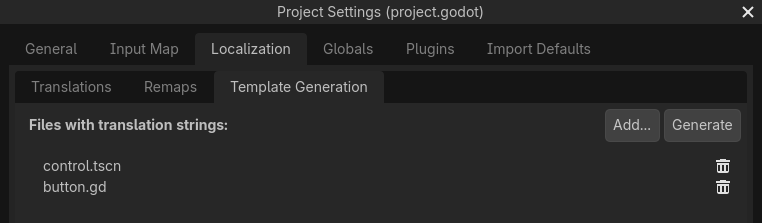
Creating a PO template in the tab of the Project Settings
After adding at least one scene or script, click in the
top-right corner, then specify the path to the output file with a pot file extension. This file can be
placed anywhere in the project directory, but it's recommended to keep it in a
subdirectory such as locale, as each locale will be defined in its own file.
请参阅下文了解如何添加面向翻译者的注释,以及如何从 GDScript 文件的 PO 模板中排除某些字符串。
然后就可以转到《从 PO 模板创建消息文件》。
备注
请记住,在对可本地化的字符串进行任何更改或新增新场景或脚本后重新生成 PO 模板。否则,新添加的字符串将不可本地化,并且翻译人员将无法更新过时字符串的翻译。
手动创建
如果该自动生成的方法不能满足你的需求,你可以在文本编辑器中手动创建 PO 模板。该文件可以放在项目目录中的任何位置,但建议将其保存在子目录中,因为每个区域设置都将在其自己的文件中定义。
Create a directory named locale in the project directory. In this directory,
save a file named messages.pot with the following content:
# Don't remove the two lines below, they're required for gettext to work correctly.
msgid ""
msgstr ""

# Example of a regular string.
msgid "Hello world!"
msgstr ""

# Example of a string with pluralization.
msgid "There is %d apple."
msgid_plural "There are %d apples."
msgstr[0] ""
msgstr[1] ""

# Example of a string with a translation context.
msgctxt "Actions"
msgid "Close"
msgstr ""
gettext 中的消息由 msgid 和 msgstr 对组成。msgid 为源字符串(一般为英文),msgstr 为翻译后的字符串。
警告
PO 模板文件(.pot)中的 msgstr 值应始终为空。本地化会在生成的 .po 文件中进行。
从 PO 模板创建消息文件
msginit 命令用于将 PO 模板转换为消息文件。例如,要创建法语本地化文件,请在 locale 目录中使用以下命令:
msginit --no-translator --input=messages.pot --locale=fr
上面的命令会在 PO 模板所在的目录下创建一个名为 fr.po 的文件。
你也可以使用 Poedit 以图形方式完成此操作,或者通过将 POT 文件上传到你选择的 Web 平台。
在 Godot 中加载消息文件
To register a messages file as a translation in a project, open the
Project Settings, then go to ,
click then choose the .po or .mo file
in the file dialog. The locale will be inferred from the
"Language: <code>\n" property in the messages file.
备注
关于在 Godot 中导入和测试翻译的更多信息,请参阅《游戏的国际化》。
按照 PO 模板更新消息文件
更新 PO 模板后,你必须更新消息文件以使其包含新字符串,同时删除已经在 PO 模板中不复存在的字符串。这可以使用 msgmerge 工具自动完成:
# The order matters: specify the message file *then* the PO template!
msgmerge --update --backup=none fr.po messages.pot
如果你想保留原始消息文件的备份(在本例中会保存为 fr.po~),请删除 --backup=none 参数。
备注
运行 msgmerge 后,在 .po 文件中,源语言中修改过的字符串的前面会添加一条“fuzzy”注释。该注释表示翻译应更新以匹配新的源字符串,因为翻译在更新之前很可能是不准确的。
在翻译更新并删除“fuzzy”注释之前,Godot 不会读取带有“fuzzy”注释的字符串。
检查 PO 文件或模板的有效性
It is possible to check whether a gettext file's syntax is valid.
If you open with Poeditor, it will display the appropriate warnings if there's some syntax errors. You can also verify by running the gettext command below:
msgfmt fr.po --check
如果有语法错误或警告就会显示在控制台中。否则 msgfmt 不会输出任何内容。
使用二进制 MO 文件(仅适用于大型项目)
大型项目会有成千上万的字符串要翻译,相比于基于文本的 PO 文件,使用(编译为)二进制的 MO 消息文件可能更加划算。二进制 MO 文件比对应的 PO 文件更小、读起来更快。
可以使用以下命令生成 MO 文件:
msgfmt fr.po --no-hash -o fr.mo
If the PO file is valid, this command will create an fr.mo file besides
the PO file. This MO file can then be loaded in Godot as described above.
原始 PO 文件应保留在版本控制中,以便你将来更新翻译。如果你丢失了原始 PO 文件,并希望将 MO 文件反编译为基于文本的 PO 文件,你可以这样做:
msgunfmt fr.mo > fr.po
反编译出的文件不包含注释和模糊字符串,因为它们一开始就没有编译进 MO 文件里。
从 GDScript 文件中提取可本地化的字符串
内置的编辑器插件能够识别源代码中的多种模式,可以从 GDScript 文件中提取可本地化的字符串,包括但不限于以下内容:
对
tr()、tr_n()、atr()、atr_n()的调用;为
text、placeholder_text、tooltip_text等属性赋值;对
add_tab()、add_item()、set_tab_title()等函数的调用;FileDialog的过滤器格式如"*.png ; PNG 图像"。
备注
参数和右操作数必须为字符串常量,否则插件无法对表达式求值,会将其忽略。
如果插件提取了不必要的字符串,你可以使用 NO_TRANSLATE 注释来忽略。你也可以使用 TRANSLATORS: 注释为翻译人员提供额外信息。这些注释必须放在与识别模式相同的行上,或者放在前一行。
$CharacterName.text = "???" # NO_TRANSLATE

# NO_TRANSLATE: Language name.
$TabContainer.set_tab_title(0, "Python")

item.text = "Tool" # TRANSLATORS: Up to 10 characters.

# TRANSLATORS: This is a reference to Lewis Carroll's poem "Jabberwocky",
# make sure to keep this as it is important to the plot.
say(tr("He took his vorpal sword in hand. The end?"))
使用上下文
context 参数可用于区分翻译的使用场景或处理多义词。
例如:
tr("Start", "Main Menu")
tr("End", "Main Menu")
tr("Shop", "Main Menu")
tr("Shop", "In Game")
In a gettext PO file, a string with a context can be defined as follows:
# Example of a string with a translation context.
msgctxt "Main Menu"
msgid "Shop"
msgstr ""

# A different source string that is identical, but with a different context.
msgctxt "In Game"
msgid "Shop"
msgstr ""
更新 PO 文件
Some time or later, you'll add new content to our game, and there will be new strings that need to be translated. When this happens, you'll need to update the existing PO files to include the new strings.
First, generate a new POT file containing all the existing strings plus the newly added strings. After that, merge the existing PO files with the new POT file. There are two ways to do this:
使用 gettext 编辑器,这种编辑器中通常提供通过 POT 文件更新 PO 文件的选项。
使用 gettext 的
msgmerge工具:
# The order matters: specify the message file *then* the PO template!
msgmerge --update --backup=none fr.po messages.pot
如果你想保留原始消息文件的备份(在本例中会保存为 fr.po~),请删除 --backup=none 参数。
自定义 POT 生成插件
If you have any extra file format to deal with, you could write a custom plugin to parse and and extract the strings from the custom file. This custom plugin will extract the strings and write into the POT file when you hit Generate POT. To learn more about how to create the translation parser plugin, see EditorTranslationParserPlugin.