GDScript 静态类型编程
在本指南中,你将学会:
如何在 GDScript 中使用静态类型编程;
静态类型编程可以帮助你避免问题;
静态类型编程可以提升编辑器的使用体验。
这项语言功能的使用场合、使用方式完全取决于你:你可以只在部分敏感的 GDScript 文件中使用,也可以在所有地方都使用,甚至可以完全不使用。
静态类型编程可用于变量、常量、函数、参数和返回类型。
静态类型编程简介
使用 GDScript 静态类型编程,Godot 在编写代码时甚至可以帮你检测到更多代码错误,在你工作时为你和你的团队提供更多信息,当你调用方法时,会显示出参数的类型。静态类型编程也能改善编辑器的自动补全体验,其中也包括脚本的文档。
想象你正在编写背包系统,你需要编写一个 Item(道具)节点,然后再编写一个 Inventory(背包)。要将道具添加到背包中,使用你所编写的代码的开发者应始终将 Item 传递给 Inventory.add() 方法。有了类型,你就可以强制执行以下操作:
class_name Inventory


func add(reference: Item, amount: int = 1):
    var item := find_item(reference)
    if not item:
        item = _instance_item_from_db(reference)
    item.amount += amount
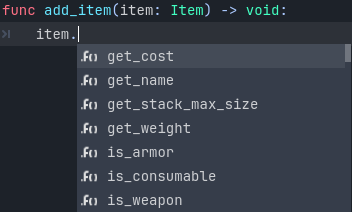
静态类型编程还能为你提供更好的代码补全选项。下面,你可以看到一个名为 PlayerController 类的动态类型和静态类型补全选项之间的区别。
你之前可能已经将节点存储在了变量中,打了一个句点符号,却没有代码自动补全提示:
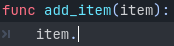
由于动态代码是动态的,因此 Godot 无法得知你传递给函数的值的类型。可如果你明确地声明了类型,则将从该节点类型获取所有公共方法和变量:
小技巧
如果你倾向于使用静态类型,我们建议开启编辑器选项文本编辑器 > 补全 > 添加类型提示,顺便也可以考虑开启默认关闭的某些警告。
同时,在操作数/参数类型在编译时已知时,静态类型编程编写的 GDScript 代码还能通过优化后的操作码提升代码运行性能。未来还计划进行更多 GDScript 方面的优化,如 JIT/AOT 编译。
总体而言,静态类型编程可为你提供更加结构化的体验,有助于避免代码错误,改善脚本的文档生成能力。当你在团队中或长期项目中工作时,静态类型编程将会特别有用。研究表明,开发人员将大部分时间要么都花在阅读别人的代码上,要么都花在阅读他们以前编写过但后来忘掉的脚本上。代码越清晰、越结构化,开发人员理解得也就越快,项目开发的速度也就越快。
如何使用静态类型编程
要定义变量、参数、常量的类型,请在名称后写一个英文冒号,再写上类型。例如 var health: int。这样就能够让变量的类型始终保持一致:
var damage: float = 10.5
const MOVE_SPEED: float = 50.0
func sum(a: float = 0.0, b: float = 0.0) -> float:
    return a + b
如果你写了冒号但是省略类型,Godot 就会尝试推导类型:
var damage := 10.5
const MOVE_SPEED := 50.0
func sum(a := 0.0, b := 0.0) -> float:
    return a + b
备注
对于常量而言,
=和:=没有区别。常量不需要写类型提示,Godot 会自动根据所赋的值设置该常量的类型,你仍然可以写上类型提示来让代码更整洁。同时,这样写对于类型化数组也还是很有用的(比如
const A: Array[int] = [1, 2, 3]),因为默认使用的是无类型的数组。
类型提示可以是什么
下面列出的是所有可以用作类型提示的东西:
Variant,任何类型。大多数情况下与不写类型声明差不多,但能够增加可读性。作为返回类型时,能够强制函数显式返回值。(仅作返回类型使用)
void。表示函数不返回任何值。内置类型。
原生类(
Object、Node、Area2D、Camera2D等)。全局类。
内部类。
全局具名常量与内部具名常量。注意:枚举是
int类型的数据,不能保证一个值属于该枚举。包含预加载类和枚举的常量(或局部常量)。
任何类都可以用作类型,包括自定义类。在脚本中使用这些类型的方法有两种。第一种是将要用作类型的脚本预加载为常量:
const Rifle = preload("res://player/weapons/rifle.gd")
var my_rifle: Rifle
The second method is to use the class_name keyword when you create the script.
For the example above, your rifle.gd would look like this:
class_name Rifle
extends Node2D
使用 class_name 时,Godot 会在编辑器中注册一个全局 Rifle 类型,可以在任何地方使用该类型,无需将其预加载到常量当中:
var my_rifle: Rifle
使用箭头 -> 来定义函数的返回类型
要定义函数的返回类型,请在声明后写一个横杠和一个右尖括号 ->,后跟返回类型:
func _process(delta: float) -> void:
    pass
类型 void 表示函数不返回任何内容。你可以使用任何类型,如变量:
func hit(damage: float) -> bool:
    health_points -= damage
    return health_points <= 0
你还可以使用自定义类作为返回类型:
# Adds an item to the inventory and returns it.
func add(reference: Item, amount: int) -> Item:
    var item: Item = find_item(reference)
    if not item:
        item = ItemDatabase.get_instance(reference)

    item.amount += amount
    return item
协变与逆变
继承基类方法时,应遵循里氏代换原则。
协变:继承方法时,你可以为子类方法指定一个比该子类方法的父类方法更为具体的返回值类型(子类型)。
逆变:继承方法时,你可以为子类方法指定一个比该子类方法的父类方法更不具体的参数类型(超类型)。
示例:
class_name Parent


func get_property(param: Label) -> Node:
    # ...
class_name Child extends Parent


# `Control` is a supertype of `Label`.
# `Node2D` is a subtype of `Node`.
func get_property(param: Control) -> Node2D:
    # ...
指定 Array 的元素类型
要定义 Array 的类型,请将类型名称填写在 [] 内。
An array's type applies to for loop variables, as well as some operators like
[], [...] = (assignment), and +. Array methods
(such as push_back) and other operators (such as ==)
are still untyped. Built-in types, native and custom classes,
and enums may be used as element types. Nested array types (like Array[Array[int]])
are not supported.
var scores: Array[int] = [10, 20, 30]
var vehicles: Array[Node] = [$Car, $Plane]
var items: Array[Item] = [Item.new()]
var array_of_arrays: Array[Array] = [[], []]
# var arrays: Array[Array[int]] -- disallowed

for score in scores:
    # score has type `int`

# The following would be errors:
scores += vehicles
var s: String = scores[0]
scores[0] = "lots"
从 Godot 4.2 开始,你还可以为 for 循环的循环变量指定类型。比如,你可以这样写:
var names = ["John", "Marta", "Samantha", "Jimmy"]
for name: String in names:
    pass
数组仍旧不会限定类型,但 for 循环的 name 循环变量则始终为 String 类型。
指定 Dictionary 的元素类型
要为 Dictionary 的键和值定义类型,请将类型名称写在 [] 中,键的类型和值的类型使用英文逗号分隔。
A dictionary's value type applies to for loop variables, as well as some operators like
[] and [...] = (assignment). Dictionary methods that return values
and other operators (such as ==) are still untyped. Built-in types, native
and custom classes, and enums may be used as element types. Nested typed collections
(like Dictionary[String, Dictionary[String, int]]) are not supported.
var fruit_costs: Dictionary[String, int] = { "apple": 5, "orange": 10 }
var vehicles: Dictionary[String, Node] = { "car": $Car, "plane": $Plane }
var item_tiles: Dictionary[Vector2i, Item] = { Vector2i(0, 0): Item.new(), Vector2i(0, 1): Item.new() }
var dictionary_of_dictionaries: Dictionary[String, Dictionary] = { { } }
# var dicts: Dictionary[String, Dictionary[String, int]] -- disallowed

for cost in fruit_costs:
    # cost has type `int`

# The following would be errors:
fruit_costs["pear"] += vehicles
var s: String = fruit_costs["apple"]
fruit_costs["orange"] = "lots"
类型转换
类型转换是类型语言的关键概念,转型是指将值从一种类型转换为另一种类型的操作或过程。
想象你的游戏中的一个敌人,extends Area2D。你希望它与游戏角色,即一个附带有一个名为 PlayerController 的脚本的 CharacterBody2D, 碰撞,那么你可以使用 body_entered 信号来检测碰撞。使用类型化代码,其检测到的物体(body)将是通用的 PhysicsBody2D 而非 _on_body_entered 回调上使用的 PlayerController。
你可以使用 as 关键字来检查这个 PhysicsBody2D 是否就是你的 Player,使用冒号 : 可以强制变量使用这种类型。这样会强制变量使用 PlayerController 类型:
func _on_body_entered(body: PhysicsBody2D) -> void:
    var player := body as PlayerController
    if not player:
        return

    player.damage()
在处理自定义类型时,如果 body 没有继承 PlayerController 类,则 player 变量将被赋值为 null。我们可以用这种操作来检查物体是否为游戏玩家角色。多亏了类型转换,我们还能获得 player 变量的代码自动补全功能。
备注
在变量类型在运行时中不匹配的情况下,as 关键字会将变量的值静默转型为 null,不会触发任何警告与报错,虽然在某些情况下会比较好用,但也会带来一些问题。尽在需要强制转型的时候使用 as,否则请使用 is 来代替转型语法:
if not (body is PlayerController):
    push_error("Bug: body is not PlayerController.")

var player: PlayerController = body
if not player:
    return

player.damage()
你还可以使用 is not 运算符来简化代码:
if body is not PlayerController:
    push_error("Bug: body is not PlayerController")
你也可以使用 aasert() 语句:
assert(body is PlayerController, "Bug: body is not PlayerController.")

var player: PlayerController = body
if not player:
    return

player.damage()
备注
如果你尝试使用内置类型进行转型且转型失败,则将触发 Godot 脚本编辑器底部报错。
安全行
你也可以使用转型语法来确保存在安全行,安全行是 Godot 3.1 中加入的新工具,可以告诉你一行歧义代码在什么情况下类型安全。由于你有时会混合使用静态类型代码和动态类型代码,有时如果指令在运行时触发错误,Godot 可能没有足够的信息进行判断。
当你需要获得子节点时就会发生这种情况。以计时器为例:使用动态代码,你可以使用 $Timer 获取节点。GDScript 支持鸭子类型,即使你的计时器是 Timer 类型,计时器也继承了 Node 和 Object 这两个类。使用动态类型的 GDScript,只要节点具有你需要调用的方法,你也不必关心节点的类型。
当你得到一个节点时,可以使用强制转型来告诉 Godot 你所期望的类型: ($Timer as Timer) 、 ($Player as KinematicBody2D) 等,Godot 将确认该类型是否有效,如果有效,在脚本编辑器的左侧的行号将会变为绿色。

不安全代码行(第 7 行)vs 安全代码行(第 6 行和第 8 行)
备注
安全行并不总表示该行代码更加优秀可靠,见前文所述的 as 关键字。比如:
@onready var node_1 := $Node1 as Type1 # Safe line.
@onready var node_2: Type2 = $Node2 # Unsafe line.
虽然 node_2 的声明被标记为了不安全行,但比起 node_1 的声明来看却更加可靠,这是因为如果你不小心在场景中更改了节点的类型,又忘记把它改回去的话,就会在场景加载时触发报错。node_1 的情况则是会被静默转型成 null ,触发报错。
备注
可以在编辑器设置中关闭安全行或更改其颜色。
静态编程还是动态编程:坚持一种风格
静态类型的 GDScript 和动态类型的 GDScript 可共存于同一项目,但还是建议二选其一,以确保每个人代码风格的一致性。如果你们遵循相同的规范,那么每个人就都可以更轻松地协作,阅读、理解他人的代码也就会更加迅速。
虽然静态类型的代码需要敲更多的字,但你将获得前文所述的种种好处。下面是内容一样的空脚本示例,使用动态类型:
extends Node


func _ready():
    pass


func _process(delta):
    pass
使用静态类型:
extends Node


func _ready() -> void:
    pass


func _process(delta: float) -> void:
    pass
如你所见,你也可以对引擎虚函数的参数进行类型声明。和方法一样,信号的回调参数也可以指定类型,下面是一个动态类型的 body_entered 信号示例:
func _on_area_2d_body_entered(body):
    pass
同一个回调,但带类型提示:
func _on_area_2d_body_entered(body: PhysicsBody2D) -> void:
    pass
警告系统
备注
关于 GDScript 警告系统的文档已移至 GDScript 警告系统。
你一边编写代码,Godot 会一边给出代码相关的警告。引擎会识别出代码中可能在运行时引发问题的部分,让你来决定是否需要保持原样。
我们针对使用类型化 GDScript 的用户提供了不少警告。这些警告默认是禁用的,可以在项目设置中启用(调试 > GDScript,请确保打开了高级设置)。
若始终进行静态类型编程,你可以启用 UNTYPED_DECLARATION 警告。此外,你还可以启用 INFERRED_DECLARATION 警告来让你的代码可读性更强、更有可靠性,但同时也会让你的代码更加冗长。
UNSAFE_* 警告会让不安全操作比不安全行更容易引人注意。目前, UNSAFE_* 警告并不能涵盖不安行所涵盖的所有情况。
常见的不安全操作及其安全操作
Global scope methods
The following global scope methods are not statically typed, but they have typed counterparts available. These methods return statically typed values:
Method |
Statically typed equivalents |
|---|---|
(untyped
clamp() does not work on Color) |
|
When using static typing, use the typed global scope methods whenever possible. This ensures you have safe lines and benefit from typed instructions for better performance.
UNSAFE_PROPERTY_ACCESS 与 UNSAFE_METHOD_ACCESS 警告
In this example, we aim to set a property and call a method on an object
that has a script attached with class_name MyScript and that extends
Node2D. If we have a reference to the object as a Node2D (for instance,
as it was passed to us by the physics system), we can first check if the
property and method exist and then set and call them if they do:
if "some_property" in node_2d:
    node_2d.some_property = 20  # Produces UNSAFE_PROPERTY_ACCESS warning.

if node_2d.has_method("some_function"):
    node_2d.some_function()  # Produces UNSAFE_METHOD_ACCESS warning.
However, this code will produce UNSAFE_PROPERTY_ACCESS and
UNSAFE_METHOD_ACCESS warnings as the property and method are not present
in the referenced type - in this case a Node2D. To make these operations
safe, you can first check if the object is of type MyScript using the
is keyword and then declare a variable with the type MyScript on
which you can set its properties and call its methods:
if node_2d is MyScript:
    var my_script: MyScript = node_2d
    my_script.some_property = 20
    my_script.some_function()
Alternatively, you can declare a variable and use the as operator to try
to cast the object. You'll then want to check whether the cast was successful
by confirming that the variable was assigned:
var my_script := node_2d as MyScript
if my_script != null:
    my_script.some_property = 20
    my_script.some_function()
UNSAFE_CAST 警告
In this example, we would like the label connected to an object entering our
collision area to show the area's name. Once the object enters the collision
area, the physics system sends a signal with a Node2D object, and the most
straightforward (but not statically typed) solution to do what we want could
be achieved like this:
func _on_body_entered(body: Node2D) -> void:
    body.label.text = name  # Produces UNSAFE_PROPERTY_ACCESS warning.
This piece of code produces an UNSAFE_PROPERTY_ACCESS warning because
label is not defined in Node2D. To solve this, we could first check if the
label property exist and cast it to type Label before settings its text
property like so:
func _on_body_entered(body: Node2D) -> void:
    if "label" in body:
        (body.label as Label).text = name  # Produces UNSAFE_CAST warning.
However, this produces an UNSAFE_CAST warning because body.label is of a
Variant type. To safely get the property in the type you want, you can use the
Object.get() method which returns the object as a Variant value or returns
null if the property doesn't exist. You can then determine whether the
property contains an object of the right type using the is keyword, and
finally declare a statically typed variable with the object:
func _on_body_entered(body: Node2D) -> void:
    var label_variant: Variant = body.get("label")
    if label_variant is Label:
        var label: Label = label_variant
        label.text = name
不能指定类型的情况
最后,我们将介绍一些不能使用类型提示的情况。以下所有示例 都会触发报错 。
不能指定数组或字典中单个元素的类型:
var enemies: Array = [$Goblin: Enemy, $Zombie: Enemy]
var character: Dictionary = {
    name: String = "Richard",
    money: int = 1000,
    inventory: Inventory = $Inventory,
}
目前不支持类型嵌套:
var teams: Array[Array[Character]] = []
总结
静态类型的 GDScript 是一个十分强大的工具,可以帮助编写更多结构化的代码,避免常见错误,创建灵活的代码系统。将来,由于即将进行的编译器优化,静态类型也将会带来不错的性能提升。