使用 PCK 加密密钥编译
发布项目时,导出对话框提供了使用 256 位 AES 密钥加密 PCK 文件的选项。这样就可以确保你的场景、脚本以及其他资源不会明文存储,脚本小子无法轻易解包。
当然,密钥需要存储在二进制文件中,但是经过编译、优化、去除符号后,是需要花费一些精力才能找到的。
为此,你需要使用相同的密钥,从源代码构建导出模板。
警告
如果你使用官方预编译的导出模板,是不会起作用的。要使用 PCK 加密,绝对必须自己编译导出模板。
渐进式教程
生成十六进制的 256 位 AES 密钥。你可以使用此服务的 aes-256-cbc 版本。
或者,你可以通过使用 OpenSSL 命令行工具自己生成:
openssl rand -hex 32 > godot.gdkey
godot.gdkey中的输出应该类似:# NOTE: Do not use the key below! Generate your own key instead. aeb1bc56aaf580cc31784e9c41551e9ed976ecba10d315db591e749f3f64890f不将输出重定向到文件也可以生成密钥,但这样能将暴露密钥的风险降到最低。
在控制台中将此处的密钥设置为环境变量,编译 Godot 时会用到,如下所示:
export SCRIPT_AES256_ENCRYPTION_KEY="your_generated_key"
set SCRIPT_AES256_ENCRYPTION_KEY=your_generated_key
$env:SCRIPT_AES256_ENCRYPTION_KEY="your_generated_key"Note that the commands suggested above do not persist the variables across terminal sessions.
Compile Godot export templates and set them as custom export templates in the export preset options. If the environment variable is set correctly, the following message is printed at the beginning of compilation:
*** IMPORTANT: Compiling Godot with custom `SCRIPT_AES256_ENCRYPTION_KEY` set as environment variable.
*** Make sure to use templates compiled with this key when exporting a project with encryption.
在导出预设的加密选项卡中设置加密密钥:
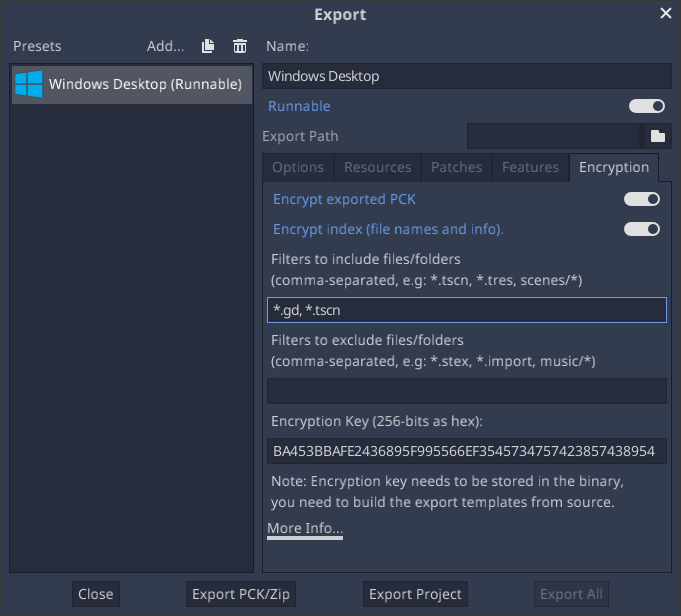
添加要加密文件/文件夹的过滤器。默认情况下,包含过滤器为空,所有文件都不加密。
导出项目。项目现在应该使用加密文件运行。
故障排除
如果出现类似下面的错误,就表示你的 Godot 构建中没有正确包含密钥。Godot 在导出时加密了 PCK 文件,但是无法在运行时读取。
ERROR: open_and_parse: Condition "String::md5(md5.digest) != String::md5(md5d)" is true. Returning: ERR_FILE_CORRUPT
   At: core/io/file_access_encrypted.cpp:103