渲染器概述
参见
This page gives an overview of Godot's renderers, focusing on the differences between their rendering features. For more technical details on the renderers, see 内部渲染架构.
前言
Godot 4 包括 三个渲染器:
Forward+。最先进的渲染器,仅适合桌面平台,桌面平台默认使用。该渲染器使用 Vulkan、Direct3D 12 或 Metal 作为渲染驱动,使用 RenderingDevice 后端。
Mobile(移动)。功能较少,但渲染简单场景的速度更快。适用于移动平台和桌面平台。移动平台默认使用该渲染器。该渲染器使用 Vulkan、Direct3D 12 或 Metal 作为渲染驱动,使用 RenderingDevice 后端。
Compatibility(兼容),有时被称作 GL Compatibility(GL 兼容)。最低级的渲染器,适合低端桌面和移动平台。在 Web 平台上默认使用。此渲染器使用 OpenGL 作为渲染后端。
渲染器、渲染驱动程序和 RenderingDevice
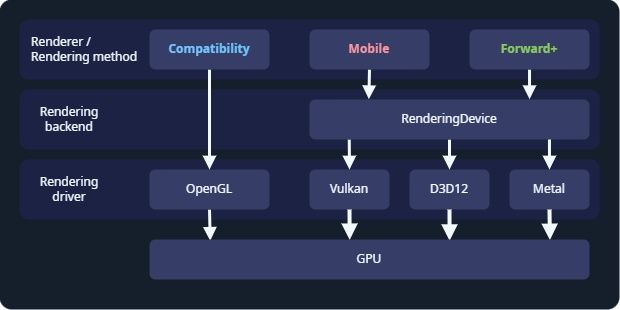
Godot 的渲染抽象层。
The renderer, or rendering method, determines which features are available. Most of the time, this is the only thing you need to think about. Godot's renderers are Forward+, Mobile, and Compatibility.
The rendering driver tells the GPU what to do, using a graphics API. Godot can use the OpenGL, Vulkan, Direct3D 12, and Metal rendering drivers. Not every GPU supports every rendering driver, and therefore not every GPU supports all renderers. Vulkan, Direct3D 12, and Metal are modern, low-level graphics APIs, and requires newer hardware. OpenGL is an older graphics API that runs on most hardware.
RenderingDevice is a rendering backend, an abstraction layer between the renderer and the rendering driver. It is used by the Forward+ and Mobile renderers, and these renderers are sometimes called "RenderingDevice-based renderers".
选择渲染器
渲染器的选择是一个复杂的问题,取决于你的硬件以及你在针对哪些平台进行开发。抛砖引玉:
以下情况选择 Forward+:
你正在针对桌面进行开发。
你的硬件较新,支持 Vulkan、Direct3D 12 或 Metal。
你在开发 3D 游戏。
你想使用最先进的渲染功能。
以下情况选择 Mobile:
你在针对较新的移动设备、桌面 XR 或桌面进行开发。
你的硬件较新,支持 Vulkan、Direct3D 12 或 Metal。
你在开发 3D 游戏。
你想要使用高级渲染功能,但还要考虑移动硬件的限制。
以下情况请选择 Compatibility:
你在为较旧的移动设备、较旧的桌面设备或独立的 XR 设备进行开发。Compatibility 渲染器支持的硬件最广泛。
你在为 Web 平台开发。此时 Compatibility 是唯一的选择。
你的硬件较旧,不支持 Vulkan。此时 Compatibility 是唯一的选择。
你在开发 2D 游戏,或者不需要高级渲染功能的 3D 游戏。
你想要在所有设备上获得最佳性能,不需要高级渲染功能。
Keep in mind every game is unique, and this is only a starting point. For example, you might choose to use the Compatibility renderer even though you have the latest GPU, so you can support the widest range of hardware. Or you might want to use the Forward+ renderer for a 2D game, so you can use advanced features like compute shaders.
切换渲染器
在编辑器中,点击右上角的渲染器名称就可以切换渲染器。
Switching between renderers may require some manual tweaks to your scene, lighting, and environment, since each renderer is different. In general, switching between the Mobile and Forward+ renderers will require fewer adjustments than switching between the Compatibility renderer and the Forward+ or Mobile renderers.
Since Godot 4.4, when using Forward+ or Mobile, if Vulkan is not supported, the engine will fall back to Direct3D 12 and vice versa. If the attempted fallback driver is not supported either, the engine will then fall back to Compatibility when the RenderingDevice backend is not supported. This allows the project to run anyway, but it may look different than the intended appearance due to the more limited renderer. This behavior can be disabled in the project settings by unchecking Rendering > Rendering Device > Fallback to OpenGL 3.
功能比较
This is not a complete list of the features of each renderer. If a feature is not listed here, it is available in all renderers, though it may be much faster on some renderers. For a list of all features in Godot, see 特性列表.
Hardware with RenderingDevice support is hardware which can run Vulkan, Direct3D 12, or Metal.
总体比较
特性 |
兼容 |
移动端 |
Forward+ |
|---|---|---|---|
硬件要求 |
较旧或低端。 |
较新或高端。需要支持 Vulkan、Direct3D 12 或 Metal。 |
较新或高端。需要支持 Vulkan、Direct3D 12 或 Metal。 |
在新硬件上运行 |
✔️ 是。 |
✔️ 是。 |
✔️ 是。 |
在较旧和低端硬件上运行 |
✔️ 是。 |
✔️ 是,但比 Compatibility 慢。 |
✔️ 是,但是所有渲染器中最慢的。 |
在不支持 RenderingDevice 的硬件上运行 |
✔️ 是。 |
❌ 否。 |
❌ 否。 |
目标平台 |
移动平台、低端桌面平台、网页。 |
移动平台、桌面平台。 |
桌面平台。 |
桌面 |
✔️ 是。 |
✔️ 是。 |
✔️ 是。 |
移动端 |
✔️ 是(低端)。 |
✔️ 是(高端)。 |
⚠️ 支持,但优化较差。请改用 Mobile 或 Compatibility。 |
XR |
✔️ 是。推荐用于独立头戴设备。 |
✔️ Yes. Recommended for desktop headsets. |
⚠️ 支持,但优化较差。请改用 Mobile 或 Compatibility。 |
Web |
✔️ 是。 |
❌ 否。 |
❌ 否。 |
2D 游戏 |
✔️ 是。 |
✔️ 是,但对于 2D 来说,Compatibility 通常已经足够好了。 |
✔️ 是,但对于 2D 来说,Compatibility 通常已经足够好了。 |
3D 游戏 |
✔️ 是。 |
✔️ 是。 |
✔️ 是。 |
特性集 |
2D 和核心 3D 特性。 |
大多数渲染特性。 |
所有渲染特性。 |
2D 渲染特性 |
✔️ 是。 |
✔️ 是。 |
✔️ 是。 |
核心 3D 渲染特性 |
✔️ 是。 |
✔️ 是。 |
✔️ 是。 |
高级渲染特性 |
❌ 否。 |
⚠️ 是,受限于移动设备硬件。 |
✔️ 是。支持所有渲染功能。 |
新特性 |
⚠️ 部分新的渲染特性会加入 Compatibility。这些特性会在 Mobile 和 Forward+ 之后添加。 |
✔️ 大多数新的渲染特性都会加入 Mobile。Mobile 通常会和 Forward+ 同时获得新特性。 |
✔️ 所有新特性都会加入 Forward+。作为新开发的重点,Forward+ 会优先获得新特性。 |
渲染开销 |
基础开销较低,但扩展开销较高。 |
中等基础开销,中等扩展开销。 |
基础开销最高,扩展开销较低。 |
渲染驱动 |
OpenGL。 |
Vulkan、Direct3D 12 或 Metal。 |
Vulkan、Direct3D 12 或 Metal。 |
灯光和阴影
详见 3D 灯光和阴影。
特性 |
兼容 |
移动端 |
Forward+ |
|---|---|---|---|
光照方法 |
向前 |
向前 |
集群向前 |
最大 OmniLight 数 |
每个网格 8 个。可以增加。 |
每个网格 8 个,每个视图 256 个。 |
每个集群 512 个。可以增加。 |
Maximum SpotLights |
每个网格 8 个。可以增加。 |
每个网格 8 个,每个视图 256 个。 |
每个集群 512 个。可以增加。 |
最大 DirectionalLight 数 |
8 |
8 |
8 |
OmniLight 和 SpotLight 的 PCSS |
❌ 不支持。 |
✔️ 支持。 |
✔️ 支持。 |
DirectionalLight 的 PCSS |
❌ 不支持。 |
❌ 不支持。 |
✔️ 支持。 |
灯光投影纹理 |
❌ 不支持。 |
✔️ 支持。 |
✔️ 支持。 |
全局光照
详情见 全局光照简介。
特性 |
兼容 |
移动端 |
Forward+ |
|---|---|---|---|
ReflectionProbe |
✔️ 支持,每个网格 2 个。 |
✔️ 支持,每个网格 8 个。 |
✔️ 支持,无限制。 |
LightmapGI |
⚠️ 支持烘焙光照贴图的渲染。烘焙需要支持 RenderingDevice 的硬件。 |
✔️ 支持。 |
✔️ 支持。 |
VoxelGI |
❌ 不支持。 |
❌ 不支持。 |
✔️ 支持。 |
屏幕空间间接光照(SSIL) |
❌ 不支持。 |
❌ 不支持。 |
✔️ 支持。 |
有符号距离场全局光照(SDFGI) |
❌ 不支持。 |
❌ 不支持。 |
✔️ 支持。 |
环境和后期处理
详情见 环境和后期处理。
特性 |
兼容 |
移动端 |
Forward+ |
|---|---|---|---|
雾(深度与高度) |
✔️ 支持。 |
✔️ 支持。 |
✔️ 支持。 |
体积雾 |
❌ 不支持。 |
❌ 不支持。 |
✔️ 支持。 |
色调映射 |
✔️ 支持。 |
✔️ 支持。 |
✔️ 支持。 |
屏幕空间反射 |
❌ 不支持。 |
❌ 不支持。 |
✔️ 支持。 |
屏幕空间环境光遮蔽(SSAO) |
✔️ 支持。 |
❌ 不支持。 |
✔️ 支持。 |
屏幕空间间接光照(SSIL) |
❌ 不支持。 |
❌ 不支持。 |
✔️ 支持。 |
有符号距离场全局光照(SDFGI) |
❌ 不支持。 |
❌ 不支持。 |
✔️ 支持。 |
辉光 |
✔️ 支持。 |
✔️ 支持。 |
✔️ 支持。 |
调整 |
✔️ 支持。 |
✔️ 支持。 |
✔️ 支持。 |
使用全屏四边形自定义后期处理 |
✔️ 支持。 |
✔️ 支持。 |
✔️ 支持。 |
使用 CompositorEffect 自定义后期处理 |
❌ 不支持。 |
✔️ 支持。 |
✔️ 支持。 |
抗锯齿
详情见 3D 抗锯齿。
特性 |
兼容 |
移动端 |
Forward+ |
|---|---|---|---|
MSAA 3D |
✔️ 支持。 |
✔️ 支持。 |
✔️ 支持。 |
MSAA 2D |
❌ 不支持。 |
✔️ 支持。 |
✔️ 支持。 |
TAA |
❌ 不支持。 |
❌ 不支持。 |
✔️ 支持。 |
FSR2 |
❌ 不支持。 |
❌ 不支持。 |
✔️ 支持。 |
FXAA |
❌ 不支持。 |
✔️ 支持。 |
✔️ 支持。 |
SSAA |
✔️ 支持。 |
✔️ 支持。 |
✔️ 支持。 |
屏幕空间粗糙度限制器 |
❌ 不支持。 |
✔️ 支持。 |
✔️ 支持。 |
StandardMaterial 功能
详情见 标准 3D 材质与 ORM 3D 材质。
特性 |
兼容 |
移动端 |
Forward+ |
|---|---|---|---|
次表面散射 |
❌ 不支持。 |
❌ 不支持。 |
✔️ 支持。 |
着色器特性
详情见 着色参考。
特性 |
兼容 |
移动端 |
Forward+ |
|---|---|---|---|
屏幕纹理 |
✔️ 支持。 |
✔️ 支持。 |
✔️ 支持。 |
深度纹理 |
✔️ 支持。 |
✔️ 支持。 |
✔️ 支持。 |
Normal/Roughness buffer |
❌ 不支持。 |
❌ 不支持。 |
✔️ 支持。 |
计算着色器 |
❌ 不支持。 |
⚠️ 支持,但在较旧的设备上会有性能损失。 |
✔️ 支持。 |
其他功能
特性 |
兼容 |
移动端 |
Forward+ |
|---|---|---|---|
可变速率着色 |
❌ 不支持。 |
✔️ 支持。 |
✔️ 支持。 |
贴花 |
❌ 不支持。 |
✔️ 支持。 |
✔️ 支持。 |
粒子尾迹 |
❌ 不支持。 |
✔️ 支持。 |
✔️ 支持。 |
Particle SDF collision |
❌ 不支持。 |
✔️ 支持。 |
✔️ 支持。 |
景深模糊 |
❌ 不支持。 |
✔️ 支持。 |
✔️ 支持。 |
自适应和邮箱模式的垂直同步 |
❌ 不支持。 |
✔️ 支持。 |
✔️ 支持。 |
2D HDR 视口 |
❌ 不支持。 |
✔️ 支持。 |
✔️ 支持。 |
RenderingDevice 访问 |
❌ 不支持。 |
✔️ 支持。 |
✔️ 支持。 |