GDExtension C 示例
前言
这是一个关于如何在 C 代码中直接使用 GDExtension 的简单示例。请注意,相关 API 的初衷并不是直接使用,所以注定会相当冗长,即便是小型示例也需要大量步骤。不过可以把这个示例当作绑定其他语言的参考。如果你愿意,仍然可以直接使用这些 API,用来绑定第三方库的话可能比较方便。
在这个示例中,我们将创建一个自定义节点,会根据用户参数在屏幕上移动精灵。虽然非常简单,但它展示了 GDExtension 的使用方法,比如注册带有方法、属性和信号的自定义类,可以让你对 GDExtension API 有一个初步的了解。
设置项目
你需要满足以下几点前提条件:
Godot 4.2(或后续版本)可执行文件,
C 编译器,
使用 Scons 作为构建工具。
由于是直接使用 API,就不需要使用 godot-cpp 仓库了。
文件结构
我们主要分两个文件夹来组织文件:
gdextension_c_example/
|
+--project/                  # game example/demo to test the extension
|
+--src/                   # source code of the extension we are building
我们还需要复制一份 Godot 源码中的 gdextension_interface.h 头文件,可以运行下面的命令直接从 Godot 可执行文件中获取:
godot --dump-gdextension-interface
这样就会在当前文件夹中创建这个头文件,你可以将其复制到示例项目的 src 文件夹中。
最后,我们还需要参考另一个信息来源,那就是包含 Godot API 参考的 JSON 文件。代码不会直接使用这个文件,我们只会手动从中提取一些信息。
要获取这个 JSON 文件,只需调用 Godot 可执行文件:
godot --dump-extension-api
最终的 extension_api.json 文件会在当前文件夹中创建。你可以将其复制到示例文件夹中,方便查看。
备注
这个扩展是针对 Godot 4.2 开发的,但应该也能在后续版本中使用。如果你想要针对其他最低版本开发,请确保从该版本的 Godot 中获取对应的头文件和 JSON。
构建系统
使用构建系统可以让我们在处理 C 代码时更加轻松。方便起见,我们将使用 SCons,因为 Godot 本身使用的就是这个构建系统。
下面的 SConstruct 文件是一个简单的示例,会根据你当前使用的平台来构建扩展,无论是 Linux、macOS 还是 Windows。得到的是一个用于调试的未优化构建。这个文件还认为你要使用 64 位构建,示例代码中的某些部分会涉及到。制作其他构建类型和交叉编译都不在本教程的讨论范围内。请将此文件保存到根文件夹中。
#!/bin/env python
from SCons.Script import Environment
from os import path
import sys

env = Environment()

# Set the target path and name.
target_path = "project/bin/"
target_name = "libgdexample"

# Set the compiler and flags.
env.Append(CPPPATH=["src"])  # Add the src folder to the include path.
env.Append(CFLAGS=["-O0", "-g"])  # Make it a debug build.

# Use Clang on macOS.
if sys.platform == "darwin":
    env["CC"] = "clang"

# Add all C files in "src" folder as sources.
sources = env.Glob("src/*.c")

# Create a shared library.
library = env.SharedLibrary(
    target=path.join(target_path, target_name),
    source=sources,
)

# Set the library as the default target.
env.Default(library)
这个文件会包含 src 文件夹中的所有 C 文件,因此在添加新的源文件时,我们就不需要再更改此文件了。
初始化扩展
第一段代码负责扩展的初始化,作用是让 Godot 知道我们的 GDExtension 提供了哪些内容,例如类和插件。
请在 src 文件夹中创建 init.h 文件,内容如下:
#pragma once

#include "defs.h"

#include "gdextension_interface.h"

void initialize_gdexample_module(void *p_userdata, GDExtensionInitializationLevel p_level);
void deinitialize_gdexample_module(void *p_userdata, GDExtensionInitializationLevel p_level);
GDExtensionBool GDE_EXPORT gdexample_library_init(GDExtensionInterfaceGetProcAddress p_get_proc_address, GDExtensionClassLibraryPtr p_library, GDExtensionInitialization *r_initialization);
这里声明的函数具有 GDExtension API 所期望的签名。
注意其中包含了 defs.h 文件。这是我们的一个辅助工具,用于简化扩展代码的编写。目前它只包含 GDE_EXPORT 的定义,这是一个宏,用于在共享库中公开函数,方便 Godot 正确调用。这个宏有助于抽象不同编译器的要求。
请在 src 文件夹中创建 defs.h 文件,内容如下:
#pragma once

#include <stdbool.h>
#include <stddef.h>
#include <stdint.h>

#if !defined(GDE_EXPORT)
#if defined(_WIN32)
#define GDE_EXPORT __declspec(dllexport)
#elif defined(__GNUC__)
#define GDE_EXPORT __attribute__((visibility("default")))
#else
#define GDE_EXPORT
#endif
#endif // ! GDE_EXPORT
我们还包含了一些标准头文件来简化操作。现在只需要包含 defs.h 就会顺带把这些头文件包含进来。
现在,让我们来实现刚刚声明的函数。请在 src 文件夹中创建一个名为 init.c 的文件,添加以下代码:
#include "init.h"

void initialize_gdexample_module(void *p_userdata, GDExtensionInitializationLevel p_level)
{
}

void deinitialize_gdexample_module(void *p_userdata, GDExtensionInitializationLevel p_level)
{
}

GDExtensionBool GDE_EXPORT gdexample_library_init(GDExtensionInterfaceGetProcAddress p_get_proc_address, GDExtensionClassLibraryPtr p_library, GDExtensionInitialization *r_initialization)
{
    r_initialization->initialize = initialize_gdexample_module;
    r_initialization->deinitialize = deinitialize_gdexample_module;
    r_initialization->userdata = NULL;
    r_initialization->minimum_initialization_level = GDEXTENSION_INITIALIZATION_SCENE;

    return true;
}
这段代码设置了 Godot 所需的初始化数据。这里设置了初始化函数和反初始化函数,Godot 可以在需要时调用。另外还设置了初始化级别,这个级别因扩展而异。因为我们计划添加的是一个自定义节点,所以 SCENE 级别就足够了。
我们会在 initialize_gdexample_module() 函数里注册自定义类,内容稍后再写。
最简单的类
要创建实际的节点,我们首先需要创建一个 C 结构体来存放数据,创建一些函数来充当方法。我们的计划是让自定义节点继承 Sprite2D。
请在 src 文件夹中创建 gdexample.h 文件,内容如下:
#pragma once

#include "gdextension_interface.h"

#include "defs.h"

// Struct to hold the node data.
typedef struct
{
    // Metadata.
    GDExtensionObjectPtr object; // Stores the underlying Godot object.
} GDExample;

// Constructor for the node.
void gdexample_class_constructor(GDExample *self);

// Destructor for the node.
void gdexample_class_destructor(GDExample *self);

// Bindings.
void gdexample_class_bind_methods();
这里值得注意的是存放指向 Godot 对象指针的 object 字段,以及注册自定义类元数据(属性、方法、信号)的 gdexample_class_bind_methods() 函数。后者并不是完全必要的,因为我们可以在注册类时注册元数据,但使用专门的函数可以将关注点分离,让类注册自己的元数据。
object 字段是必需的,因为我们的类要继承 Godot 中的类。由于并不是在和源代码交互(甚至 C 里也没有类),我们无法直接进行继承,而是要让 Godot 创建已知类型的对象,然后将我们的扩展附加到这个对象上。举个例子,我们调用父类方法的时候就需要引用这个对象。
让我们为这个头文件创建对应的源码。请在 src 文件夹中创建 gdexample.c 文件,添加如下代码:
#include "gdexample.h"

void gdexample_class_constructor(GDExample *self)
{
}

void gdexample_class_destructor(GDExample *self)
{
}

void gdexample_class_bind_methods()
{
}
这些函数我们暂时还用不到,就先留空。
下一步是类的注册。不过,在此之前我们需要创建一个 StringName,为此我们必须从 GDExtension API 中获取一个函数。由于我们会多次用到这个功能,并且还需要其他一些东西,让我们创建一个封装 API 来简化这类繁琐的工作。
封装 API
我们首先在 src 文件夹中创建 api.h 文件:
#pragma once

/*
This file works as a collection of helpers to call the GDExtension API
in a less verbose way, as well as a cache for methods from the discovery API,
just so we don't have to keep loading the same methods again.
*/

#include "gdextension_interface.h"

#include "defs.h"

extern GDExtensionClassLibraryPtr class_library;

// API methods.

extern struct Constructors
{
    GDExtensionInterfaceStringNameNewWithLatin1Chars string_name_new_with_latin1_chars;
} constructors;

extern struct Destructors
{
    GDExtensionPtrDestructor string_name_destructor;
} destructors;

extern struct API
{
    GDExtensionInterfaceClassdbRegisterExtensionClass2 classdb_register_extension_class2;
} api;

void load_api(GDExtensionInterfaceGetProcAddress p_get_proc_address);
随着我们对扩展的不断完善,这个文件中还会逐渐包含许多其他辅助工具。目前就只有三个函数指针:一个用来根据 C 字符串(Latin-1 编码)创建 StringName;一个用来析构 StringName,我们需要用它来避免内存泄漏;第三个函数则是用来注册类的,是我们最初的目标。
我们这里还留了一个对 class_library 的引用。这是 Godot 在初始化扩展时提供给我们的内容,需要在注册我们创建的内容时用到,方便 Godot 知道是哪个扩展在进行调用。
还有一个函数的作用是从 GDExtension API 中加载这些函数指针。
我们来处理这个头文件对应的源码吧。请在 src 文件夹中创建 api.c 文件,添加如下代码:
#include "api.h"

GDExtensionClassLibraryPtr class_library = NULL;

struct Constructors constructors;
struct Destructors destructors;
struct API api;

void load_api(GDExtensionInterfaceGetProcAddress p_get_proc_address)
{
    // Get helper functions first.
    GDExtensionInterfaceVariantGetPtrDestructor variant_get_ptr_destructor = (GDExtensionInterfaceVariantGetPtrDestructor)p_get_proc_address("variant_get_ptr_destructor");

    // API.
    api.classdb_register_extension_class2 = (GDExtensionInterfaceClassdbRegisterExtensionClass2)p_get_proc_address("classdb_register_extension_class2");

    // Constructors.
    constructors.string_name_new_with_latin1_chars = (GDExtensionInterfaceStringNameNewWithLatin1Chars)p_get_proc_address("string_name_new_with_latin1_chars");

    // Destructors.
    destructors.string_name_destructor = variant_get_ptr_destructor(GDEXTENSION_VARIANT_TYPE_STRING_NAME);
}
这里第一个重要的部分是 p_get_proc_address。这是 GDExtension API 中的一个函数,在初始化时传入。你可以使用这个函数通过名称向 API 请求对应的函数。我们在这里将结果缓存了起来,这样就不必再到处保留对 p_get_proc_address 的引用,可以直接使用我们的封装函数。
我们最开始请求的是 variant_get_ptr_destructor() 函数。这个函数不会在此函数之外使用,因此我们不将其添加到封装器中,只在本地缓存。这个类型转换是必要的,可以消除编译器警告。
然后我们获取的是之前提到过的根据 C 字符串创建 StringName 的函数。我们将其存储在 constructors 结构体中。
接下来,我们使用刚刚获取的 variant_get_ptr_destructor() 函数来查询 StringName 的析构函数,参数是 gdextension_interface.h API 中的枚举值。其他类型的析构函数也可以通过类似的方式获取,不过这里就只获取示例代码需要用到的东西了。
最后,我们获取的是 classdb_register_extension_class2() 函数,需要用它来注册自定义类。
备注
你可能会好奇为什么函数名称里有个 2。它表示的是这是这个函数的第二个版本。保留旧版本是为了确保向后兼容旧的扩展,但既然可以用第二版,我们就最好使用这个新版本,因为我们在这个示例中不打算支持旧版本的 Godot。
gdextension_interface.h 头文件记录了每个函数是在哪个 Godot 版本中引入的。
我们还在这里定义了 class_library 变量,会在初始化时设置。
说到初始化,现在我们需要修改 init.c 文件,填入我们刚刚添加的内容:
GDExtensionBool GDE_EXPORT gdexample_library_init(GDExtensionInterfaceGetProcAddress p_get_proc_address, GDExtensionClassLibraryPtr p_library, GDExtensionInitialization *r_initialization)
{
    class_library = p_library;
    load_api(p_get_proc_address);

    ...
我们在这里设置了所需的 class_library 并调用了新的 load_api() 函数。别忘了在文件顶部包含新的头文件:
#include "init.h"

#include "api.h"
#include "gdexample.h"
...
既然我们在这里,就可以注册一下我们的自定义类。让我们填写 initialize_gdexample_module() 函数:
void initialize_gdexample_module(void *p_userdata, GDExtensionInitializationLevel p_level)
{
    if (p_level != GDEXTENSION_INITIALIZATION_SCENE)
    {
        return;
    }

    // Register class.
    StringName class_name;
    constructors.string_name_new_with_latin1_chars(&class_name, "GDExample", false);
    StringName parent_class_name;
    constructors.string_name_new_with_latin1_chars(&parent_class_name, "Sprite2D", false);

    GDExtensionClassCreationInfo2 class_info = {
        .is_virtual = false,
        .is_abstract = false,
        .is_exposed = true,
        .set_func = NULL,
        .get_func = NULL,
        .get_property_list_func = NULL,
        .free_property_list_func = NULL,
        .property_can_revert_func = NULL,
        .property_get_revert_func = NULL,
        .validate_property_func = NULL,
        .notification_func = NULL,
        .to_string_func = NULL,
        .reference_func = NULL,
        .unreference_func = NULL,
        .create_instance_func = gdexample_class_create_instance,
        .free_instance_func = gdexample_class_free_instance,
        .recreate_instance_func = NULL,
        .get_virtual_func = NULL,
        .get_virtual_call_data_func = NULL,
        .call_virtual_with_data_func = NULL,
        .get_rid_func = NULL,
        .class_userdata = NULL,
    };

    api.classdb_register_extension_class2(class_library, &class_name, &parent_class_name, &class_info);

    // Bind methods.
    gdexample_class_bind_methods();

    // Destruct things.
    destructors.string_name_destructor(&class_name);
    destructors.string_name_destructor(&parent_class_name);
}
包含类信息的结构体是这里最重要的部分。除了 create_instance_func 和 free_instance_func 之外,其他字段都不是必需的。我们还没有创建这些函数,所以稍后需要着手处理。请注意,我们在不是 SCENE 层级时跳过了初始化。这个函数可能会被多次调用,每个层级调用一次,但我们只想注册一次类。
这里的另一个未定义项是 StringName。在我们的扩展中,这是一个用来存放 Godot 的 StringName 数据的不透明结构体。顾名思义,我们会在 defs.h 文件中定义:
...
// The sizes can be obtained from the extension_api.json file.
#ifdef BUILD_32
#define STRING_NAME_SIZE 4
#else
#define STRING_NAME_SIZE 8
#endif

// Types.

typedef struct
{
    uint8_t data[STRING_NAME_SIZE];
} StringName;
如注释所述,大小可以在我们之前生成的 extension_api.json 文件中找到,位于 builtin_class_sizes 属性下。BUILD_32 并没有定义,因为我们假设在这里使用的是 64 位的 Godot 构建,但如果你需要的话就可以将 env.Append(CPPDEFINES=["BUILD_32"]) 添加到你的 SConstruct 文件中。
// Types. 注释预示着我们将在这个文件中添加更多类型。这个我们以后再说。
The StringName struct here is just to hold Godot data, so we don't really
care what is inside of it. Though, in this case, it is just a pointer to the
data in the heap. We'll use this struct when we need to allocate data for a
StringName ourselves, like we are doing when registering our class.
Back to registering, we need to work on our create and free functions. Let's
include them in gdexample.h since they're specific to the custom class:
...
// Bindings.
void gdexample_class_bind_methods();
GDExtensionObjectPtr gdexample_class_create_instance(void *p_class_userdata);
void gdexample_class_free_instance(void *p_class_userdata, GDExtensionClassInstancePtr p_instance);
...
Before we can implement those function, we'll need a few more things in our API.
We need a way to allocate and free memory. While we could do this with good ol'
malloc(), we can instead make use of Godot's memory management functions.
We'll also need a way to create a Godot object and set it with our custom
instance.
So let's change the api.h to include these new functions:
...
extern struct API
{
    GDExtensionInterfaceClassdbRegisterExtensionClass2 classdb_register_extension_class2;
    GDExtensionInterfaceClassdbConstructObject classdb_construct_object;
    GDExtensionInterfaceObjectSetInstance object_set_instance;
    GDExtensionInterfaceObjectSetInstanceBinding object_set_instance_binding;
    GDExtensionInterfaceMemAlloc mem_alloc;
    GDExtensionInterfaceMemFree mem_free;
} api;
Then we change the load_api() function in api.c to grab these new functions:
...
void load_api(GDExtensionInterfaceGetProcAddress p_get_proc_address)
{
    ...
    // API.
    api.classdb_register_extension_class2 = p_get_proc_address("classdb_register_extension_class2");
    api.classdb_construct_object = (GDExtensionInterfaceClassdbConstructObject)p_get_proc_address("classdb_construct_object");
    api.object_set_instance = (GDExtensionInterfaceObjectSetInstance)p_get_proc_address("object_set_instance");
    api.object_set_instance_binding = (GDExtensionInterfaceObjectSetInstanceBinding)p_get_proc_address("object_set_instance_binding");
    api.mem_alloc = (GDExtensionInterfaceMemAlloc)p_get_proc_address("mem_alloc");
    api.mem_free = (GDExtensionInterfaceMemFree)p_get_proc_address("mem_free");
}
Now we can go back to gdexample.c and define the new functions, without forgetting to
include the api.h header:
#include "gdexample.h"

#include "api.h"

...

const GDExtensionInstanceBindingCallbacks gdexample_class_binding_callbacks = {
    .create_callback = NULL,
    .free_callback = NULL,
    .reference_callback = NULL,
};

GDExtensionObjectPtr gdexample_class_create_instance(void *p_class_userdata)
{
    // Create native Godot object;
    StringName class_name;
    constructors.string_name_new_with_latin1_chars(&class_name, "Sprite2D", false);
    GDExtensionObjectPtr object = api.classdb_construct_object(&class_name);
    destructors.string_name_destructor(&class_name);

    // Create extension object.
    GDExample *self = (GDExample *)api.mem_alloc(sizeof(GDExample));
    gdexample_class_constructor(self);
    self->object = object;

    // Set the extension instance in the native Godot object.
    constructors.string_name_new_with_latin1_chars(&class_name, "GDExample", false);
    api.object_set_instance(object, &class_name, self);
    api.object_set_instance_binding(object, class_library, self, &gdexample_class_binding_callbacks);
    destructors.string_name_destructor(&class_name);

    return object;
}

void gdexample_class_free_instance(void *p_class_userdata, GDExtensionClassInstancePtr p_instance)
{
    if (p_instance == NULL)
    {
        return;
    }
    GDExample *self = (GDExample *)p_instance;
    gdexample_class_destructor(self);
    api.mem_free(self);
}
When instantiating an object, first we create a new Sprite2D object, since that's the parent of our class. Then we allocate memory for our custom struct and call its constructor. We save the pointer to the Godot object in the struct as well like we mentioned earlier.
Then we set our custom struct as the instance data. This will make Godot know that the object is an instance of our custom class and properly call our custom methods for instance, as well as passing this data back.
Note that we return the Godot object we created, not our custom struct.
For the gdextension_free_instance() function, we only call the destructor and free the memory we
allocated for the custom data. It is not necessary to destruct the Godot object
since that will be taken care of by the engine itself.
演示项目
Now that we can create and free our custom object, we should be able to try it
out in an actual project. For this, you need to open Godot and create a new
project in the project folder. The project manager may warn you the folder
isn't empty if you have compiled the extension before, you can safely ignore
this warning this time.
If you didn't compile the extension yet, it is the time to do it now. To do
that, open a terminal or command prompt, navigate to the root folder of the
extension and run scons. It should compile quickly since the extension is
very simple.
Then, create a file called gdexample.gdextension inside the project folder.
This is a Godot resource that describes the extension, allowing the engine to
properly load it. Put the following content in this file:
[configuration]

entry_symbol = "gdexample_library_init"
compatibility_minimum = "4.2"

[libraries]
macos.debug = "res://bin/libgdexample.dylib"
linux.debug = "res://bin/libgdexample.so"
windows.debug = "res://bin/libgdexample.dll"
As you can see, gdexample_library_init() is the same name of the function we
defined in our init.c file. It is important that the names match because it
is how Godot calls the entry point of the extension.
We also set the compatibility minimum to 4.2, since we are targeting this version. It should still work on later versions. If you are using a later Godot version and rely on the new features, you need to increase this value to a version number that has everything you use. See 版本兼容性 for more information.
In the [libraries] section we set up the paths to the shared library on
different platforms. Here there's only the debug versions since that's what we
are working on for the example. Using feature tags you
can fine tune this to also provide release versions, add more target operating systems, as
well as providing 32-bit and 64-bit binaries.
You can also add library dependencies and custom icons for your classes in this file, but this is out of the scope for this tutorial.
After saving the file, go back to the editor. Godot should automatically load
the extension. Nothing will be seen because our extension only registers a new
class. To use this class add a Node2D as a root of the scene. Move it to
the middle of viewport for better visibility. Then add a new child node to the
root and in the Create New Node dialog search for "GDExample", the name of
our class, as it should be listed there. If it isn't, it means that Godot didn't
load the extension properly, so try restarting the editor and retrace the steps
to see if anything went missing.
Our custom class is derived from Sprite2D, so it has a Texture property
in the Inspector. Set this to the icon.svg file that Godot handily created
for us when making the project. Save this scene as main.tscn and run it. You
may want to set it as the main scene for convenience.
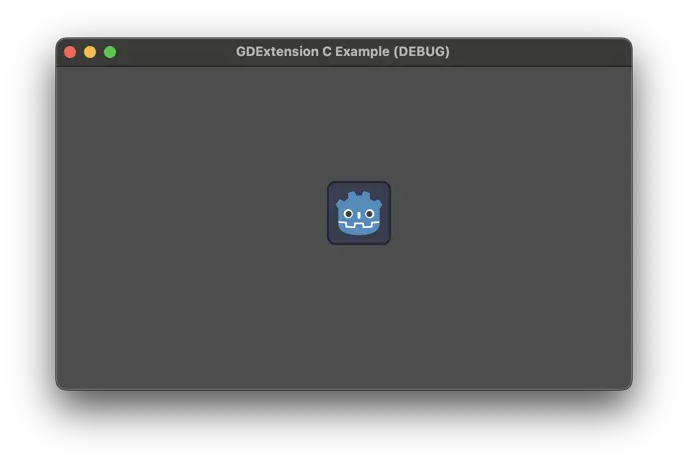
Voilà! We have a custom node running in Godot. However, it does not do anything
and has nothing different than a regular Sprite2D node. We will fix that next by
adding custom methods and properties.
自定义方法
A common thing in extensions is creating methods for the custom classes and exposing those to the Godot API. We are going to create a couple of getters and setters which are need for binding the properties afterwards.
First, let's add the new fields in our struct to hold the values for
amplitude and speed, which we will use later on when creating the
behavior for the node. Add them to the gdexample.h file, changing the
GDExample struct:
...

typedef struct
{
    // Public properties.
    double amplitude;
    double speed;
    // Metadata.
    GDExtensionObjectPtr object; // Stores the underlying Godot object.
} GDExample;

...
In the same file, add the declaration for the getters and setters, right after the destructor.
...

// Destructor for the node.
void gdexample_class_destructor(GDExample *self);

// Properties.
void gdexample_class_set_amplitude(GDExample *self, double amplitude);
double gdexample_class_get_amplitude(const GDExample *self);
void gdexample_class_set_speed(GDExample *self, double speed);
double gdexample_class_get_speed(const GDExample *self);

...
In the gdexample.c file, we will initialize these values in the constructor
and add the implementations for those new functions, which are quite trivial:
void gdexample_class_constructor(GDExample *self)
{
    self->amplitude = 10.0;
    self->speed = 1.0;
}

void gdexample_class_set_amplitude(GDExample *self, double amplitude)
{
    self->amplitude = amplitude;
}

double gdexample_class_get_amplitude(const GDExample *self)
{
    return self->amplitude;
}

void gdexample_class_set_speed(GDExample *self, double speed)
{
    self->speed = speed;
}

double gdexample_class_get_speed(const GDExample *self)
{
    return self->speed;
}
To make those simple functions work when called by Godot, we will need some wrappers to help us properly convert the data to and from the engine.
First, we will create wrappers for ptrcall. This is what Godot uses when the
types of the values are known to be exact, which avoids using Variant. We're
gonna need two of those: one for the functions that take no arguments and
return a double (for the getters) and another for the functions that take a
single double argument and return nothing (for the setters).
在 api.h 文件中添加声明:
void ptrcall_0_args_ret_float(void *method_userdata, GDExtensionClassInstancePtr p_instance, const GDExtensionConstTypePtr *p_args, GDExtensionTypePtr r_ret);
void ptrcall_1_float_arg_no_ret(void *method_userdata, GDExtensionClassInstancePtr p_instance, const GDExtensionConstTypePtr *p_args, GDExtensionTypePtr r_ret);
Those two functions follow the GDExtensionClassMethodPtrCall type, as
defined in the gdextension_interface.h. We use float as a name here
because in Godot the float type has double precision, so we keep this
convention.
Then we implement those functions in the api.c file:
void ptrcall_0_args_ret_float(void *method_userdata, GDExtensionClassInstancePtr p_instance, const GDExtensionConstTypePtr *p_args, GDExtensionTypePtr r_ret)
{
    // Call the function.
    double (*function)(void *) = method_userdata;
    *((double *)r_ret) = function(p_instance);
}

void ptrcall_1_float_arg_no_ret(void *method_userdata, GDExtensionClassInstancePtr p_instance, const GDExtensionConstTypePtr *p_args, GDExtensionTypePtr r_ret)
{
    // Call the function.
    void (*function)(void *, double) = method_userdata;
    function(p_instance, *((double *)p_args[0]));
}
The method_userdata argument is a custom value that we give to Godot, in
this case we will set as the function pointer for the one we want to call. So
first we convert it to the function type, then we just call it by passing the
arguments when needed, or setting the return value.
The p_instance argument contains the custom instance of our class, which we
gave with object_set_instance() when creating the object.
p_args is an array of arguments. Note this contains pointers to the
values. That's why we dereference it when passing to our functions. The number
of arguments will be declared when binding the function (which we will do soon)
and it will always include default ones if those exist.
Finally, the r_ret is a pointer to the variable where the return value needs to
be set. Like the arguments, it will be the correct type as declared. For the
function that does not return, we have to avoid setting it.
Note how the type and argument counts are exact, so if we needed different types, for example, we would have to create more wrappers. This could be automated using some code generation, but this is out of the scope for this tutorial.
While the ptrcall functions are used when types are exact, sometimes Godot cannot know
if that's the case (when the call comes from a dynamically typed language, such
as GDScript). In those situations it uses regular call functions, so we need to
provide those as well when binding.
让我们在 api.h 文件中创建两个新的封装:
void call_0_args_ret_float(void *method_userdata, GDExtensionClassInstancePtr p_instance, const GDExtensionConstVariantPtr *p_args, GDExtensionInt p_argument_count, GDExtensionVariantPtr r_return, GDExtensionCallError *r_error);
void call_1_float_arg_no_ret(void *method_userdata, GDExtensionClassInstancePtr p_instance, const GDExtensionConstVariantPtr *p_args, GDExtensionInt p_argument_count, GDExtensionVariantPtr r_return, GDExtensionCallError *r_error);
These follow the GDExtensionClassMethodCall type, which is a bit different.
First, you receive pointers to Variants instead of exact types. There's also the
amount of arguments and an error struct that you can set if something goes
wrong.
In order to check the type and also extract interact with Variant, we will need a few more functions from the GDExtension API. So let's expand our wrapper structs:
extern struct Constructors {
    ...
    GDExtensionVariantFromTypeConstructorFunc variant_from_float_constructor;
    GDExtensionTypeFromVariantConstructorFunc float_from_variant_constructor;
} constructors;

extern struct API
{
    ...
    GDExtensionInterfaceGetVariantFromTypeConstructor get_variant_from_type_constructor;
    GDExtensionInterfaceGetVariantToTypeConstructor get_variant_to_type_constructor;
    GDExtensionInterfaceVariantGetType variant_get_type;
} api;
The names say all about what those do. We have a couple of constructors to create and extract a floating point value to and from a Variant. We also have a couple of helpers to actually get those constructors, as well as a function to find out the type of a Variant.
Let's get those from the API, like we did before, by changing the load_api()
function in the api.c file:
void load_api(GDExtensionInterfaceGetProcAddress p_get_proc_address)
{
    ...

    // API.
    ...
    api.get_variant_from_type_constructor = (GDExtensionInterfaceGetVariantFromTypeConstructor)p_get_proc_address("get_variant_from_type_constructor");
    api.get_variant_to_type_constructor = (GDExtensionInterfaceGetVariantToTypeConstructor)p_get_proc_address("get_variant_to_type_constructor");
    api.variant_get_type = (GDExtensionInterfaceVariantGetType)p_get_proc_address("variant_get_type");
    ...

    // Constructors.
    ...
    constructors.variant_from_float_constructor = api.get_variant_from_type_constructor(GDEXTENSION_VARIANT_TYPE_FLOAT);
    constructors.float_from_variant_constructor = api.get_variant_to_type_constructor(GDEXTENSION_VARIANT_TYPE_FLOAT);
    ...
}
Now that we have these set, we can implement our call wrappers in the same file:
void call_0_args_ret_float(void *method_userdata, GDExtensionClassInstancePtr p_instance, const GDExtensionConstVariantPtr *p_args, GDExtensionInt p_argument_count, GDExtensionVariantPtr r_return, GDExtensionCallError *r_error)
{
    // Check argument count.
    if (p_argument_count != 0)
    {
        r_error->error = GDEXTENSION_CALL_ERROR_TOO_MANY_ARGUMENTS;
        r_error->expected = 0;
        return;
    }

    // Call the function.
    double (*function)(void *) = method_userdata;
    double result = function(p_instance);
    // Set resulting Variant.
    constructors.variant_from_float_constructor(r_return, &result);
}

void call_1_float_arg_no_ret(void *method_userdata, GDExtensionClassInstancePtr p_instance, const GDExtensionConstVariantPtr *p_args, GDExtensionInt p_argument_count, GDExtensionVariantPtr r_return, GDExtensionCallError *r_error)
{
    // Check argument count.
    if (p_argument_count < 1)
    {
        r_error->error = GDEXTENSION_CALL_ERROR_TOO_FEW_ARGUMENTS;
        r_error->expected = 1;
        return;
    }
    else if (p_argument_count > 1)
    {
        r_error->error = GDEXTENSION_CALL_ERROR_TOO_MANY_ARGUMENTS;
        r_error->expected = 1;
        return;
    }

    // Check the argument type.
    GDExtensionVariantType type = api.variant_get_type(p_args[0]);
    if (type != GDEXTENSION_VARIANT_TYPE_FLOAT)
    {
        r_error->error = GDEXTENSION_CALL_ERROR_INVALID_ARGUMENT;
        r_error->expected = GDEXTENSION_VARIANT_TYPE_FLOAT;
        r_error->argument = 0;
        return;
    }

    // Extract the argument.
    double arg1;
    constructors.float_from_variant_constructor(&arg1, (GDExtensionVariantPtr)p_args[0]);

    // Call the function.
    void (*function)(void *, double) = method_userdata;
    function(p_instance, arg1);
}
These functions are a bit longer but easy to follow. First they check if the argument count is as expected and if not they set the error struct and return. For the one that has one parameter, it also checks if the argument type is correct. This is important because mismatched types when extracting from Variant can cause crashes.
Then it proceeds to extract the argument using the constructor we setup before.
The one with no arguments instead sets the return value after calling the
function. Note how they use a pointer to a double variable, since this is
what those constructors expect.
Before we can actually bind our methods, we need a way to create
GDExtensionPropertyInfo instances. While we could do them inside the binding
functions that we'll implement afterwards, it's easier to have a helper for it
since we'll need it multiple times, including for when we bind properties.
让我们在 api.h 文件中创建这两个函数:
// Create a PropertyInfo struct.
GDExtensionPropertyInfo make_property(
    GDExtensionVariantType type,
    const char *name);

GDExtensionPropertyInfo make_property_full(
    GDExtensionVariantType type,
    const char *name,
    uint32_t hint,
    const char *hint_string,
    const char *class_name,
    uint32_t usage_flags);

void destruct_property(GDExtensionPropertyInfo *info);
The first one is a simplified version of the second since we usually don't need all the arguments for the property and are okay with the defaults. Then we also have a function to destruct the PropertyInfo since we need to create Strings and StringNames that need to be properly disposed of.
Speaking of which, we also need a way to create and destruct Strings, so we'll make an addition to existing structs in this same file. We'll also get a new API function for actually binding our custom method.
extern struct Constructors
{
    ...
    GDExtensionInterfaceStringNewWithUtf8Chars string_new_with_utf8_chars;
} constructors;

extern struct Destructors
{
    ...
    GDExtensionPtrDestructor string_destructor;
} destructors;

extern struct API
{
    ...
    GDExtensionInterfaceClassdbRegisterExtensionClassMethod classdb_register_extension_class_method;
} api;
Before implementing those, let's do a quick stop in the defs.h file and
include the size of the String type and a couple of enums:
// The sizes can be obtained from the extension_api.json file.
#ifdef BUILD_32
#define STRING_SIZE 4
#define STRING_NAME_SIZE 4
#else
#define STRING_SIZE 8
#define STRING_NAME_SIZE 8
#endif

...

typedef struct
{
    uint8_t data[STRING_SIZE];
} String;

// Enums.

typedef enum
{
    PROPERTY_HINT_NONE = 0,
} PropertyHint;

typedef enum
{
    PROPERTY_USAGE_NONE = 0,
    PROPERTY_USAGE_STORAGE = 2,
    PROPERTY_USAGE_EDITOR = 4,
    PROPERTY_USAGE_DEFAULT = PROPERTY_USAGE_STORAGE | PROPERTY_USAGE_EDITOR,
} PropertyUsageFlags;
While it's the same size as StringName, it is more clear to use a different
name for it.
The enums here are just helpers to give names to the numbers they represent. The
information about them is present in the extension_api.json file. Here we
just set up the ones we need for the tutorial, to keep it more concise.
Going now to the api.c, we need to load the pointers to the new functions we
added to the API.
void load_api(GDExtensionInterfaceGetProcAddress p_get_proc_address)
{
    ...
    // API
    ...
    api.classdb_register_extension_class_method = (GDExtensionInterfaceClassdbRegisterExtensionClassMethod)p_get_proc_address("classdb_register_extension_class_method");

    // Constructors.
    ...
    constructors.string_new_with_utf8_chars = (GDExtensionInterfaceStringNewWithUtf8Chars)p_get_proc_address("string_new_with_utf8_chars");

    // Destructors.
    ...
    destructors.string_destructor = variant_get_ptr_destructor(GDEXTENSION_VARIANT_TYPE_STRING);
}
Then we can also implement the functions to create the PropertyInfo struct.
GDExtensionPropertyInfo make_property(
    GDExtensionVariantType type,
    const char *name)
{

    return make_property_full(type, name, PROPERTY_HINT_NONE, "", "", PROPERTY_USAGE_DEFAULT);
}

GDExtensionPropertyInfo make_property_full(
    GDExtensionVariantType type,
    const char *name,
    uint32_t hint,
    const char *hint_string,
    const char *class_name,
    uint32_t usage_flags)
{

    StringName *prop_name = api.mem_alloc(sizeof(StringName));
    constructors.string_name_new_with_latin1_chars(prop_name, name, false);
    String *prop_hint_string = api.mem_alloc(sizeof(String));
    constructors.string_new_with_utf8_chars(prop_hint_string, hint_string);
    StringName *prop_class_name = api.mem_alloc(sizeof(StringName));
    constructors.string_name_new_with_latin1_chars(prop_class_name, class_name, false);

    GDExtensionPropertyInfo info = {
        .name = prop_name,
        .type = type,
        .hint = hint,
        .hint_string = prop_hint_string,
        .class_name = prop_class_name,
        .usage = usage_flags,
    };

    return info;
}

void destruct_property(GDExtensionPropertyInfo *info)
{
    destructors.string_name_destructor(info->name);
    destructors.string_destructor(info->hint_string);
    destructors.string_name_destructor(info->class_name);
    api.mem_free(info->name);
    api.mem_free(info->hint_string);
    api.mem_free(info->class_name);
}
The simple version of make_property() just calls the more complete one with a
some default arguments. What those values mean exactly is out of the scope of
this tutorial, check the page about the Object class
for more details about binding methods and properties.
The complete version is more involved. First, it creates String's and
StringName's for the needed fields, by allocating memory and calling their
constructors. Then it creates a GDExtensionPropertyInfo struct and sets all
the fields with the arguments provided. Finally it returns this created struct.
The destruct_property() function is straightforward, it simply calls the
destructors for the created objects and frees their allocated memory.
Let's go back again to the header api.h to create the functions that will
actually bind the methods:
// Version for 0 arguments, with return.
void bind_method_0_r(
    const char *class_name,
    const char *method_name,
    void *function,
    GDExtensionVariantType return_type);

// Version for 1 argument, no return.
void bind_method_1(
    const char *class_name,
    const char *method_name,
    void *function,
    const char *arg1_name,
    GDExtensionVariantType arg1_type);
Then switch back to the api.c file to implement these:
// Version for 0 arguments, with return.
void bind_method_0_r(
    const char *class_name,
    const char *method_name,
    void *function,
    GDExtensionVariantType return_type)
{
    StringName method_name_string;
    constructors.string_name_new_with_latin1_chars(&method_name_string, method_name, false);

    GDExtensionClassMethodCall call_func = call_0_args_ret_float;
    GDExtensionClassMethodPtrCall ptrcall_func = ptrcall_0_args_ret_float;

    GDExtensionPropertyInfo return_info = make_property(return_type, "");

    GDExtensionClassMethodInfo method_info = {
        .name = &method_name_string,
        .method_userdata = function,
        .call_func = call_func,
        .ptrcall_func = ptrcall_func,
        .method_flags = GDEXTENSION_METHOD_FLAGS_DEFAULT,
        .has_return_value = true,
        .return_value_info = &return_info,
        .return_value_metadata = GDEXTENSION_METHOD_ARGUMENT_METADATA_NONE,
        .argument_count = 0,
    };

    StringName class_name_string;
    constructors.string_name_new_with_latin1_chars(&class_name_string, class_name, false);

    api.classdb_register_extension_class_method(class_library, &class_name_string, &method_info);

    // Destruct things.
    destructors.string_name_destructor(&method_name_string);
    destructors.string_name_destructor(&class_name_string);
    destruct_property(&return_info);
}

// Version for 1 argument, no return.
void bind_method_1(
    const char *class_name,
    const char *method_name,
    void *function,
    const char *arg1_name,
    GDExtensionVariantType arg1_type)
{

    StringName method_name_string;
    constructors.string_name_new_with_latin1_chars(&method_name_string, method_name, false);

    GDExtensionClassMethodCall call_func = call_1_float_arg_no_ret;
    GDExtensionClassMethodPtrCall ptrcall_func = ptrcall_1_float_arg_no_ret;

    GDExtensionPropertyInfo args_info[] = {
        make_property(arg1_type, arg1_name),
    };
    GDExtensionClassMethodArgumentMetadata args_metadata[] = {
        GDEXTENSION_METHOD_ARGUMENT_METADATA_NONE,
    };

    GDExtensionClassMethodInfo method_info = {
        .name = &method_name_string,
        .method_userdata = function,
        .call_func = call_func,
        .ptrcall_func = ptrcall_func,
        .method_flags = GDEXTENSION_METHOD_FLAGS_DEFAULT,
        .has_return_value = false,
        .argument_count = 1,
        .arguments_info = args_info,
        .arguments_metadata = args_metadata,
    };

    StringName class_name_string;
    constructors.string_name_new_with_latin1_chars(&class_name_string, class_name, false);

    api.classdb_register_extension_class_method(class_library, &class_name_string, &method_info);

    // Destruct things.
    destructors.string_name_destructor(&method_name_string);
    destructors.string_name_destructor(&class_name_string);
    destruct_property(&args_info[0]);
}
Both functions are very similar. First, they create a StringName with the
method name. This is created in the stack since we don't need to keep it after
the function ends. Then they create local variables to hold the call_func
and ptrcall_func, pointing to the helper functions we defined earlier.
In the next step they diverge a bit. The first one creates a property for the
return value, which has an empty name since it's not needed. The other creates
an array of properties for the arguments, which in this case has a single
element. This one also has an array of metadata, which can be used if there's
something special about the argument (e.g. if an int value is 32 bits long
instead of the default of 64 bits).
Afterwards, they create the GDExtensionClassMethodInfo with the required
fields for each case. Then they make a StringName for the class name, in
order to associate the method with the class. Next, they call the API function
to actually bind this method to the class. Finally, we destruct the objects we
created since they aren't needed anymore.
备注
The bind helpers here use the call helpers we created earlier, so do note that
those call helpers only accept the Godot FLOAT type (which is equivalent to
double in C). If you intend to use this for other types, you would need to
check the type of the arguments and return type and select an appropriate
function callback. This is avoided here only to keep the example from becoming
even longer.
Now that we have the means to bind methods, we can actually do so in our custom
class. Go to the gdexample.c file and fill up the
gdexample_class_bind_methods() function:
void gdexample_class_bind_methods()
{
    bind_method_0_r("GDExample", "get_amplitude", gdexample_class_get_amplitude, GDEXTENSION_VARIANT_TYPE_FLOAT);
    bind_method_1("GDExample", "set_amplitude", gdexample_class_set_amplitude, "amplitude", GDEXTENSION_VARIANT_TYPE_FLOAT);

    bind_method_0_r("GDExample", "get_speed", gdexample_class_get_speed, GDEXTENSION_VARIANT_TYPE_FLOAT);
    bind_method_1("GDExample", "set_speed", gdexample_class_set_speed, "speed", GDEXTENSION_VARIANT_TYPE_FLOAT);
}
Since this function is already being called by the initialization process, we can stop here. This function is much more straightforward after we created all the infrastructure to make this work. You can see that implementing the binding functions inline here would take some space and also be quite repetitive. This also makes it easier to add another method in the future.
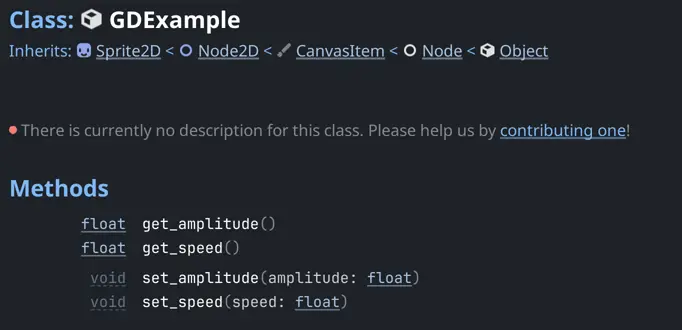
If you compile the code and reopen the Godot project, nothing will be different
at first, since we only added two new methods. To ensure those are registered
properly, you can search for GDExample in the editor help and verify they
are present in the documentation page.
自定义属性
Since we now have the getter and setter for our properties already bound, we can move forward to create actual properties that will be displayed in the Godot editor inspector.
Given our extensive setup in the previous section, there are only a few things
needed to enable us to bind properties. First, let's get a new API function in
the api.h file:
extern struct API {
    ...
    GDExtensionInterfaceClassdbRegisterExtensionClassProperty classdb_register_extension_class_property;
} api;
Let's also declare a function here to bind properties:
void bind_property(
    const char *class_name,
    const char *name,
    GDExtensionVariantType type,
    const char *getter,
    const char *setter);
In the api.c file, we can load the new API function:
void load_api(GDExtensionInterfaceGetProcAddress p_get_proc_address)
{
    // API
    ...
    api.classdb_register_extension_class_property = (GDExtensionInterfaceClassdbRegisterExtensionClassProperty)p_get_proc_address("classdb_register_extension_class_property");

    ...
}
Then we can implement our new helper function in this same file:
void bind_property(
    const char *class_name,
    const char *name,
    GDExtensionVariantType type,
    const char *getter,
    const char *setter)
{
    StringName class_string_name;
    constructors.string_name_new_with_latin1_chars(&class_string_name, class_name, false);
    GDExtensionPropertyInfo info = make_property(type, name);
    StringName getter_name;
    constructors.string_name_new_with_latin1_chars(&getter_name, getter, false);
    StringName setter_name;
    constructors.string_name_new_with_latin1_chars(&setter_name, setter, false);

    api.classdb_register_extension_class_property(class_library, &class_string_name, &info, &setter_name, &getter_name);

    // Destruct things.
    destructors.string_name_destructor(&class_string_name);
    destruct_property(&info);
    destructors.string_name_destructor(&getter_name);
    destructors.string_name_destructor(&setter_name);
}
This function is similar to the one for binding methods. The main difference is
that we don't need an extra struct since we can simply use the
GDExtensionPropertyInfo that is created by our helper function, so it's more
straightforward. It only creates the StringName values from the
C strings, creates a property info struct using our helper, calls the API
function to register the property in the class and then destructs all the objects
we created.
With this done, we can extend the gdexample_class_bind_methods() function in the
gdexample.c file:
void gdexample_class_bind_methods()
{
    bind_method_0_r("GDExample", "get_amplitude", gdexample_class_get_amplitude, GDEXTENSION_VARIANT_TYPE_FLOAT);
    bind_method_1("GDExample", "set_amplitude", gdexample_class_set_amplitude, "amplitude", GDEXTENSION_VARIANT_TYPE_FLOAT);
    bind_property("GDExample", "amplitude", GDEXTENSION_VARIANT_TYPE_FLOAT, "get_amplitude", "set_amplitude");

    bind_method_0_r("GDExample", "get_speed", gdexample_class_get_speed, GDEXTENSION_VARIANT_TYPE_FLOAT);
    bind_method_1("GDExample", "set_speed", gdexample_class_set_speed, "speed", GDEXTENSION_VARIANT_TYPE_FLOAT);
    bind_property("GDExample", "speed", GDEXTENSION_VARIANT_TYPE_FLOAT, "get_speed", "set_speed");
}
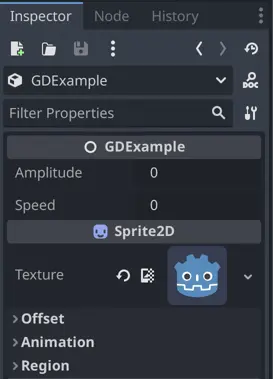
If you build the extension with scons, you'll see in the Godot editor the new property shown
not only on the documentation page for the custom class but also in the Inspector dock when the
GDExample node is selected.
绑定虚方法
Our custom node now has properties to influence how it operates, but it still doesn't do anything. In this section, we will bind the virtual method _process() and make our custom sprite move a little bit.
In the gdexample.h file, let's add a function that represents the custom
_process() method:
// Methods.
void gdexample_class_process(GDExample *self, double delta);
We'll also add a "private" field to keep track of the time passed in our custom struct. This is "private" only in the sense that it won't be bound to the Godot API, even though it is public in the C side, given the language lacks access modifiers.
typedef struct
{
    // Private properties.
    double time_passed;
    ...
} GDExample;
On the counterpart source file gdexample.c we need to initialize the new
field in the constructor:
void gdexample_class_constructor(GDExample *self)
{
    self->time_passed = 0.0;
    self->amplitude = 10.0;
    self->speed = 1.0;
}
Then we can create the simplest implementation for the _process method:
void gdexample_class_process(GDExample *self, double delta)
{
    self->time_passed += self->speed * delta;
}
For now it will do nothing but update the private field we created. We'll come back to this after the method is properly bound.
Virtual methods are a bit different from the regular bindings. Instead of
explicitly registering the method itself, we'll register a special function that
Godot will call to ask if a particular virtual method is implemented in our
extension. The engine will pass a StringName as an argument so, following
the spirit of this tutorial, we'll create a helper function to check if it is
equal to a C string.
Let's add the declaration to the api.h file:
// Compare a StringName with a C string.
bool is_string_name_equal(GDExtensionConstStringNamePtr p_a, const char *p_b);
We'll also add a new struct to this file, to hold function pointers for custom operators:
extern struct Operators
{
    GDExtensionPtrOperatorEvaluator string_name_equal;
} operators;
Then in the api.c file we'll load the function pointer from the API:
struct Operators operators;

void load_api(GDExtensionInterfaceGetProcAddress p_get_proc_address)
{
    // Get helper functions first.
    ...
    GDExtensionInterfaceVariantGetPtrOperatorEvaluator variant_get_ptr_operator_evaluator = (GDExtensionInterfaceVariantGetPtrOperatorEvaluator)p_get_proc_address("variant_get_ptr_operator_evaluator");

    ...

    // Operators.
    operators.string_name_equal = variant_get_ptr_operator_evaluator(GDEXTENSION_VARIANT_OP_EQUAL, GDEXTENSION_VARIANT_TYPE_STRING_NAME, GDEXTENSION_VARIANT_TYPE_STRING_NAME);
}
As you can see we need a new local helper here in order to grab the function pointer for the operator.
With this handy, we can easily create our comparison function in the same file:
bool is_string_name_equal(GDExtensionConstStringNamePtr p_a, const char *p_b)
{
    // Create a StringName for the C string.
    StringName string_name;
    constructors.string_name_new_with_latin1_chars(&string_name, p_b, false);

    // Compare both StringNames.
    bool is_equal = false;
    operators.string_name_equal(p_a, &string_name, &is_equal);

    // Destroy the created StringName.
    destructors.string_name_destructor(&string_name);

    // Return the result.
    return is_equal;
}
This function creates a StringName from the argument, compares with
the other one using the operator function pointer, and returns the result. Note
that the return value for the operator is passed as an out reference, this is a
common thing in the API.
Let's go back to the gdexample.h file and add a couple of functions that
will be used as the callbacks for the Godot API:
void *gdexample_class_get_virtual_with_data(void *p_class_userdata, GDExtensionConstStringNamePtr p_name);
void gdexample_class_call_virtual_with_data(GDExtensionClassInstancePtr p_instance, GDExtensionConstStringNamePtr p_name, void *p_virtual_call_userdata, const GDExtensionConstTypePtr *p_args, GDExtensionTypePtr r_ret);
There are actually two ways of registering virtual methods. Only one has the
get part, in which you give Godot a properly crafted function pointer which
will be called. For this we would need to create another helper for each virtual
method, something that is not very convenient. Instead, we use the second method
which allows us to return any data, and then Godot will call a second callback
and give us back this data along with the call information. We can simply give
our own function pointer as custom data and then have a single callback for all
virtual methods. Although in this example we will only use it for one method,
this way is simpler to expand.
So let's implement those two functions in the gdexample.c file:
void *gdexample_class_get_virtual_with_data(void *p_class_userdata, GDExtensionConstStringNamePtr p_name)
{
    // If it is the "_process" method, return a pointer to the gdexample_class_process function.
    if (is_string_name_equal(p_name, "_process"))
    {
        return (void *)gdexample_class_process;
    }
    // Otherwise, return NULL.
    return NULL;
}

void gdexample_class_call_virtual_with_data(GDExtensionClassInstancePtr p_instance, GDExtensionConstStringNamePtr p_name, void *p_virtual_call_userdata, const GDExtensionConstTypePtr *p_args, GDExtensionTypePtr r_ret)
{
    // If it is the "_process" method, call it with a helper.
    if (p_virtual_call_userdata == &gdexample_class_process)
    {
        ptrcall_1_float_arg_no_ret(p_virtual_call_userdata, p_instance, p_args, r_ret);
    }
}
Those functions are also quite straightforward after making all the helpers previously.
For the first one, we simply check if the function name requested is
_process and if it is we return a function pointer to our implementation of
it. Otherwise we return NULL, signaling that the method is not being
overridden. We don't use the p_class_userdata here since this function is
meant only for one class and we don't have any data associated with it.
The second one is similar. If it is the _process() method, it uses the given
function pointer to call the ptrcall helper, passing the call arguments
forward. Otherwise it simply does nothing, since we don't have any other virtual
methods being implemented.
The only thing missing is using those callbacks when the class is registered. Go
to the init.c file and change the class_info initialization to include
those, replacing the NULL value used previously:
void initialize_gdexample_module(void *p_userdata, GDExtensionInitializationLevel p_level)
{
    ...

    GDExtensionClassCreationInfo2 class_info = {
        ...
        .get_virtual_call_data_func = gdexample_class_get_virtual_with_data,
        .call_virtual_with_data_func = gdexample_class_call_virtual_with_data,
        ...
    };

    ...
}
This is enough to bind the virtual method. If you build the extension and run
the Godot project again, the _process() function will be called. You just won't
be able to tell since the function itself does nothing visible. We will solve
this now by making the custom node move following a pattern.
In order to make our node do stuff, we'll need to call Godot methods. Not only the GDExtension API functions as we've being doing so far, but actual engine methods, as we would do with scripting. This naturally requires some extra setup.
First, let's add Vector2 to our defs.h file, so we
can use it in our method:
// The sizes can be obtained from the extension_api.json file.
...
#ifdef REAL_T_IS_DOUBLE
#define VECTOR2_SIZE 16
#else
#define VECTOR2_SIZE 8
#endif

...

// Types.

...

typedef struct
{
    uint8_t data[VECTOR2_SIZE];
} Vector2;
The REAL_T_IS_DOUBLE define is only needed if your Godot version was built
with double precision support, which is not the default.
Now, in the api.h file, we'll add few things to the API structs, including a
new one for holding engine methods to call.
extern struct Constructors
{
    ...
    GDExtensionPtrConstructor vector2_constructor_x_y;
} constructors;

...

extern struct Methods
{
    GDExtensionMethodBindPtr node2d_set_position;
} methods;

extern struct API
{
    ...
    GDExtensionInterfaceClassdbGetMethodBind classdb_get_method_bind;
    GDExtensionInterfaceObjectMethodBindPtrcall object_method_bind_ptrcall;
} api;
Then in the api.c file we can grab the function pointers from Godot:
struct Methods methods;

void load_api(GDExtensionInterfaceGetProcAddress p_get_proc_address)
{
    // Get helper functions first.
    ...
    GDExtensionInterfaceVariantGetPtrConstructor variant_get_ptr_constructor = (GDExtensionInterfaceVariantGetPtrConstructor)p_get_proc_address("variant_get_ptr_constructor");

    // API.
    ...
    api.classdb_get_method_bind = (GDExtensionInterfaceClassdbGetMethodBind)p_get_proc_address("classdb_get_method_bind");
    api.object_method_bind_ptrcall = (GDExtensionInterfaceObjectMethodBindPtrcall)p_get_proc_address("object_method_bind_ptrcall");

    // Constructors.
    ...
    constructors.vector2_constructor_x_y = variant_get_ptr_constructor(GDEXTENSION_VARIANT_TYPE_VECTOR2, 3); // See extension_api.json for indices.

    ...
}
The only noteworthy part here is the Vector2 constructor, for which we request the
index 3. Since there are multiple constructors with different kinds of
arguments, we need to specify which one we want. In this case we're getting the
one that takes two float numbers as the x and y coordinates, hence the
name. This index can be retrieved from the extension_api.json file. Note we
also need a new local helper to get it.
Be aware that we don't get anything for the methods struct here. This is because this function is called too early in the initialization process, so classes won't be properly registered yet.
Instead, we're gonna use the initialization level callback to grab those when we
are registering our custom class. Add this to the init.c file:
void initialize_gdexample_module(void *p_userdata, GDExtensionInitializationLevel p_level)
{
    if (p_level != GDEXTENSION_INITIALIZATION_SCENE)
    {
        return;
    }

    // Get ClassDB methods here because the classes we need are all properly registered now.
    // See extension_api.json for hashes.
    StringName native_class_name;
    StringName method_name;

    constructors.string_name_new_with_latin1_chars(&native_class_name, "Node2D", false);
    constructors.string_name_new_with_latin1_chars(&method_name, "set_position", false);
    methods.node2d_set_position = api.classdb_get_method_bind(&native_class_name, &method_name, 743155724);
    destructors.string_name_destructor(&native_class_name);
    destructors.string_name_destructor(&method_name);

    ...
}
Here we create StringName's for the class and method we want to get, then use
the GDExtension API to retrieve their MethodBind, which is an object that
represents the bound method. We get the set_position method from Node2D
since this is where it was registered, even though we're going to use it in a
Sprite2D, a derived class.
The seemingly random number for getting the bind is actually a hash of the
method signature. This allows Godot to match the method you're requesting even
if in a future Godot version this signature changes, by providing a
compatibility method that matches what you're asking for. This is one of the
systems that allow the engine to load extensions made for previous versions. You
can get the value of this hash from the extension_api.json file.
With all that, we can finally implement our custom _process() method in the
gdexample.c file:
...

#include <math.h>

...

void gdexample_class_process(GDExample *self, double delta)
{
    self->time_passed += self->speed * delta;

    Vector2 new_position;

    // Set up the arguments for the Vector2 constructor.
    double x = self->amplitude + (self->amplitude * sin(self->time_passed * 2.0));
    double y = self->amplitude + (self->amplitude * cos(self->time_passed * 1.5));
    GDExtensionConstTypePtr args[] = {&x, &y};
    // Call the Vector2 constructor.
    constructors.vector2_constructor_x_y(&new_position, args);

    // Set up the arguments for the set_position method.
    GDExtensionConstTypePtr args2[] = {&new_position};
    // Call the set_position method.
    api.object_method_bind_ptrcall(methods.node2d_set_position, self->object, args2, NULL);
}
After updating the time passed scaled by the speed property, it creates
x and y values based on that, also modulated by the amplitude
property. This is what will give the pattern effect. The math.h header is
needed for the sin() and cos() functions used here.
Then it sets up an array of arguments to construct a Vector2, followed by
calling the constructor. It sets up another array of arguments and use it to
call the set_position() method via the bind we acquired previously.
Since nothing here allocates any memory, there's not a need to cleanup.
Now we can build the extension again and reopen Godot. Even in the editor you'll see the custom sprite moving.
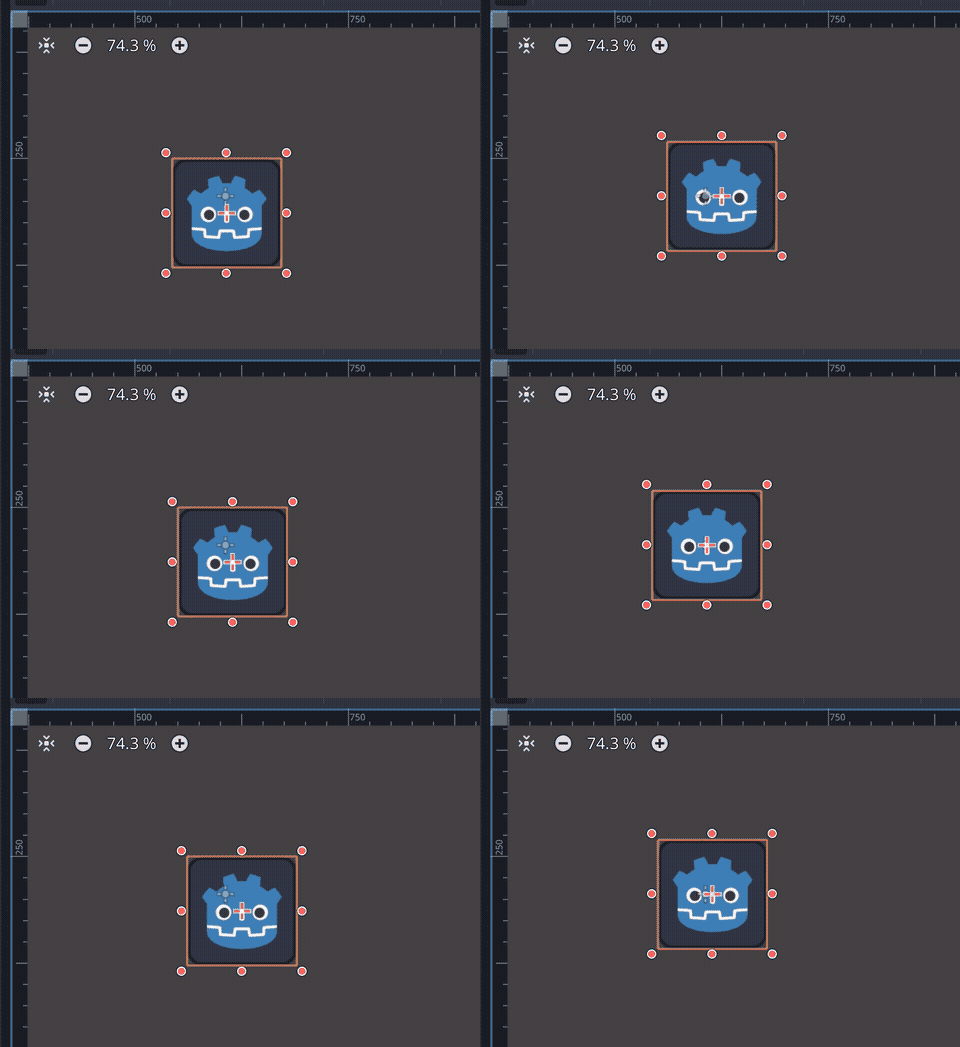
Try changing the Speed and Amplitude properties and see how the sprite react.
信号的注册和触发
To complete this tutorial, let's see how you can register a custom signal and emit it when appropriate. As you might have guessed, we'll need a few more function pointers from the API and more helper functions.
In the api.h file we're adding two things. One is an API function to
register a signal, the other is a helper function to wrap the signal binding.
extern struct API
{
    ...
    GDExtensionInterfaceClassdbRegisterExtensionClassSignal classdb_register_extension_class_signal;
} api;

...

// Version for 1 argument.
void bind_signal_1(
    const char *class_name,
    const char *signal_name,
    const char *arg1_name,
    GDExtensionVariantType arg1_type);
In this case we only have a version for one argument, since it's what we're going to use.
Moving to the api.c file, we can load this new function pointer and
implement the helper:
void load_api(GDExtensionInterfaceGetProcAddress p_get_proc_address)
{
    // API.
    ...
    api.classdb_register_extension_class_signal = (GDExtensionInterfaceClassdbRegisterExtensionClassSignal)p_get_proc_address("classdb_register_extension_class_signal");

    ...
}

void bind_signal_1(
    const char *class_name,
    const char *signal_name,
    const char *arg1_name,
    GDExtensionVariantType arg1_type)
{
    StringName class_string_name;
    constructors.string_name_new_with_latin1_chars(&class_string_name, class_name, false);
    StringName signal_string_name;
    constructors.string_name_new_with_latin1_chars(&signal_string_name, signal_name, false);

    GDExtensionPropertyInfo args_info[] = {
        make_property(arg1_type, arg1_name),
    };

    api.classdb_register_extension_class_signal(class_library, &class_string_name, &signal_string_name, args_info, 1);

    // Destruct things.
    destructors.string_name_destructor(&class_string_name);
    destructors.string_name_destructor(&signal_string_name);
    destruct_property(&args_info[0]);
}
This one is very similar to the function to bind methods. The main difference is
that we don't need to fill another struct, we just pass the needed names and the
array of arguments. The 1 at the end means the amount of arguments the
signal provides.
With this we can bind the signal in gdexample.c:
void gdexample_class_bind_methods()
{
    ...
    bind_signal_1("GDExample", "position_changed", "new_position", GDEXTENSION_VARIANT_TYPE_VECTOR2);
}
In order to emit a signal, we need to call the
emit_signal() method on our custom node.
Since this is a vararg function (meaning it takes any amount of arguments),
we cannot use ptrcall. To do a regular call, we have to create Variants,
which require a few more steps of plumbing to get done.
First, in the defs.h file we create a definition for Variant:
...

// The sizes can be obtained from the extension_api.json file.
...
#ifdef REAL_T_IS_DOUBLE
#define VARIANT_SIZE 40
#define VECTOR2_SIZE 16
#else
#define VARIANT_SIZE 24
#define VECTOR2_SIZE 8
#endif

...

// Types.

...

typedef struct
{
    uint8_t data[VARIANT_SIZE];
} Variant;
We first set the size of Variant together with the size of Vector2 that we added before. Then we use it to create an opaque struct that is enough to hold the Variant data. Again, we set the size for double precision builds as a fallback, since by the official Godot builds use single precision.
The emit_signal() function will be called with two arguments. The first is
the name of the signal to be emitted and the second is the argument we're
passing to the signal connections, which is a Vector2 as we declared when
binding it. So we're gonna create a helper function that can call a MethodBind
with these types. Even though it does return something (an error code), we don't
need to deal with it, so for now we're just going to ignore it.
In the api.h, we're adding a few things to the existing structs, plus a new
helper function for the call:
extern struct Constructors
{
    ...
    GDExtensionVariantFromTypeConstructorFunc variant_from_string_name_constructor;
    GDExtensionVariantFromTypeConstructorFunc variant_from_vector2_constructor;
} constructors;

extern struct Destructors
{
    ..
    GDExtensionInterfaceVariantDestroy variant_destroy;
} destructors;

...

extern struct Methods
{
    ...
    GDExtensionMethodBindPtr object_emit_signal;
} methods;

extern struct API
{
    ...
    GDExtensionInterfaceObjectMethodBindCall object_method_bind_call;
} api;

...

// Helper to call with Variant arguments.
void call_2_args_stringname_vector2_no_ret_variant(
    GDExtensionMethodBindPtr p_method_bind,
    GDExtensionObjectPtr p_instance,
    const GDExtensionTypePtr p_arg1,
    const GDExtensionTypePtr p_arg2);
Now let's switch to the api.c file to load these new function pointers and
implement the helper function.
void load_api(GDExtensionInterfaceGetProcAddress p_get_proc_address)
{
    // API.
    ...
    api.object_method_bind_call = (GDExtensionInterfaceObjectMethodBindCall)p_get_proc_address("object_method_bind_call");

    // Constructors.
    ...
    constructors.variant_from_string_name_constructor = api.get_variant_from_type_constructor(GDEXTENSION_VARIANT_TYPE_STRING_NAME);
    constructors.variant_from_vector2_constructor = api.get_variant_from_type_constructor(GDEXTENSION_VARIANT_TYPE_VECTOR2);

    // Destructors.
    ...
    destructors.variant_destroy = (GDExtensionInterfaceVariantDestroy)p_get_proc_address("variant_destroy");

    ...
}

...

void call_2_args_stringname_vector2_no_ret_variant(GDExtensionMethodBindPtr p_method_bind, GDExtensionObjectPtr p_instance, const GDExtensionTypePtr p_arg1, const GDExtensionTypePtr p_arg2)
{
    // Set up the arguments for the call.
    Variant arg1;
    constructors.variant_from_string_name_constructor(&arg1, p_arg1);
    Variant arg2;
    constructors.variant_from_vector2_constructor(&arg2, p_arg2);
    GDExtensionConstVariantPtr args[] = {&arg1, &arg2};

    // Add dummy return value storage.
    Variant ret;

    // Call the function.
    api.object_method_bind_call(p_method_bind, p_instance, args, 2, &ret, NULL);

    // Destroy the arguments.
    destructors.variant_destroy(&arg1);
    destructors.variant_destroy(&arg2);
    destructors.variant_destroy(&ret);
}
This helper function has some boilerplate code but is quite straightforward. It sets up the two arguments inside stack allocated Variants, then creates an array with pointers to those. It also sets up another Variant to keep the return value, which we don't need to construct since the call expects it to be uninitialized.
Then it actually calls the MethodBind using the instance we provided and the
arguments. The NULL at the end would be a pointer to a
GDExtensionCallError struct. This can be used to treat potential errors when
calling the functions (such as wrong arguments). For the sake of simplicity
we're not gonna handle that here.
At the end we need to destruct the Variants we created. While technically the Vector2 one does not require destructing, it is clearer to cleanup everything.
We also need to load the MethodBind, which we'll do in the init.c file,
right after loading the one for the set_position method we did before:
void initialize_gdexample_module(void *p_userdata, GDExtensionInitializationLevel p_level)
{
    ...

    constructors.string_name_new_with_latin1_chars(&native_class_name, "Object", false);
    constructors.string_name_new_with_latin1_chars(&method_name, "emit_signal", false);
    methods.object_emit_signal = api.classdb_get_method_bind(&native_class_name, &method_name, 4047867050);
    destructors.string_name_destructor(&native_class_name);
    destructors.string_name_destructor(&method_name);

    // Register class.
    ...
}
Note that we reuse the native_class_name and method_name variables here,
so we don't need to declare new ones.
Now go to the gdexample.h file where we're going to add a couple of fields:
typedef struct
{
    // Private properties.
    ..
    double time_emit;
    ..
    // Metadata.
    StringName position_changed; // For signal.
} GDExample;
The first one will store the time passed since the last signal was emitted, since we'll be doing so at regular intervals. The other is just to cache the signal name so we don't need to create a new StringName every time.
In the source gdexample.c file we can change the constructor and destructor
to deal with the new fields:
void gdexample_class_constructor(GDExample *self)
{
    ...
    self->time_emit = 0.0;

    // Construct the StringName for the signal.
    constructors.string_name_new_with_latin1_chars(&self->position_changed, "position_changed", false);
}

void gdexample_class_destructor(GDExample *self)
{
    // Destruct the StringName for the signal.
    destructors.string_name_destructor(&self->position_changed);
}
It is important to destruct the StringName to avoid memory leaks.
Now we can add to the gdexample_class_process() function to actually emit the
signal:
void gdexample_class_process(GDExample *self, double delta)
{
    ...

    self->time_emit += delta;
    if (self->time_emit >= 1.0)
    {
        // Call the emit_signal method.
        call_2_args_stringname_vector2_no_ret_variant(methods.object_emit_signal, self->object, &self->position_changed, &new_position);
        self->time_emit = 0.0;
    }
}
This updates the time passed for the signal emission and, if it is over one
second it calls the emit_signal() function on the current instance, passing
the name of the signal and the new position as arguments.
Now we're done with our C GDExtension. Build it once more and reopen the Godot project in the editor.
In the documentation page for GDExample you can see the new signal we bound:
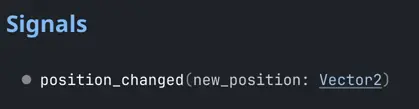
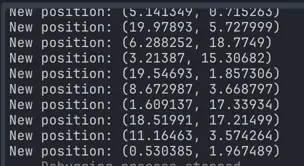
To check it's working, let's add a small script to the root node, parent of our custom one, that prints the position to the output every time it receives the signal:
extends Node2D

func _ready():
    $GDExample.position_changed.connect(on_position_changed)

func on_position_changed(new_position):
    prints("New position:", new_position)
Run the project and you can observe the values being printed in the Output dock in the editor:
总结
This tutorial shows a basic extension with custom methods, properties, and signals. While it does require a good amount of boilerplate, it can scale well by creating helper functions to handle the tedious tasks.
This should serve as a good basis to understand the GDExtension API and as a
starting point to create custom binding generators. In fact, it would be
possible to create bindings for C using such type of generator, making the
actual coding look more like the gdexample.c file in this example, which is
quite straightforward and not very verbose.
If you want to create actual extensions, it is preferred to use the C++ bindings instead, as it takes away all of the boilerplate from your code. Check the godot-cpp documentation to see how you can do this.