使用电子表格进行本地化
电子表格是游戏本地化最常用的格式之一。Godot 使用 CSV 格式来支持电子表格。本指南将介绍 CSV 的操作方法。
CSV 文件必须使用 UTF-8 编码保存,不带字节序标记。
警告
默认情况下,Microsoft Excel 始终以 ANSI 编码保存 CSV 文件,不使用 UTF-8。虽然内置的方法实现,但可以使用此处描述的变通方案。
我们推荐改用 LibreOffice 或 Google Sheets。
格式
CSV 文件必须使用以下格式:
keys |
<lang1> |
<lang2> |
<langN> |
|---|---|---|---|
KEY1 |
字符串 |
字符串 |
字符串 |
KEY2 |
字符串 |
字符串 |
字符串 |
KEYN |
字符串 |
字符串 |
字符串 |
The "lang" tags must represent a language, which must be one of the valid
locales supported by the engine, or they must start with an underscore (_),
which means the related column is served as comment and won't be imported.
The KEY tags must be unique and represent a string universally. By convention, these are
usually in uppercase to differentiate them from other strings. These keys will be replaced at
runtime by the matching translated string. Note that the case is important:
KEY1 and Key1 will be different keys.
The top-left cell is ignored and can be left empty or having any content.
Here's an example:
keys |
en |
es |
ja |
|---|---|---|---|
GREET |
Hello, friend! |
Hola, amigo! |
こんにちは |
ASK |
How are you? |
Cómo está? |
元気ですか |
BYE |
Goodbye |
Adiós |
さようなら |
QUOTE |
"Hello" said the man. |
"Hola" dijo el hombre. |
「こんにちは」男は言いました |
下面是以逗号分隔的纯文本文件形式同样的例子, 这应该是在电子表格中编辑上述内容的结果. 当编辑纯文本时, 请确保用双引号包裹任何包含逗号, 换行符或双引号的消息, 这样逗号就不会被解析为定界符, 换行符不会创建新条目, 双引号也不会被解析为包裹字符. 请确保在信息中包含的任何双引号之前使用另一个双引号来转义. 另外, 你也可以在导入选项中选择逗号以外的其他定界符.
keys,en,es,ja
GREET,"Hello, friend!","Hola, amigo!",こんにちは
ASK,How are you?,Cómo está?,元気ですか
BYE,Goodbye,Adiós,さようなら
QUOTE,"""Hello"" said the man.","""Hola"" dijo el hombre.",「こんにちは」男は言いました
Specifying plural forms
Since Godot 4.6, it is possible to specify plural forms in CSV files.
This is done by adding a column named ?plural anywhere in the table
(except on the first column, which is reserved for translation keys).
By convention, it's recommended to place it on the second column.
Note that in the example below, the key column is the one that contains English
localization.
en,?plural,fr,ru,ja,zh
?pluralrule,,nplurals=2; plural=(n >= 2);,,
There is %d apple,There are %d apples,Il y a %d pomme,Есть %d яблоко,リンゴが%d個あります,那里有%d个苹果
,,Il y a %d pommes,Есть %d яблока,,
,,,Есть %d яблок,,
备注
Automatic Control translation is not supported when using plural forms. You must translate the string manually using tr_n().
Specifying translation contexts
Since Godot 4.6, it is possible to specify
translation contexts
in CSV files. This can be used to disambiguate identical source strings that
have different meanings. While this is generally not needed when using translation
keys LIKE_THIS, it's useful when using plain English text as translation keys.
This is done by adding a column named ?context column anywhere in the table
(except on the first column, which is reserved for translation keys).
By convention, it's recommended to place it on the second column, or after
?plural if it's also used. Note that in the example below, the key column
is the one that contains English localization.
en,?context,fr,ru,ja,zh
Letter,Alphabet,Lettre,Буква,字母,字母
Letter,Message,Courrier,Письмо,手紙,信件
CSV 导入器
Godot 默认会将 CSV 文件作为翻译导入,在同一文件夹中生成一个或多个压缩后的翻译资源文件。
导入还会将翻译添加到要在游戏运行时加载的翻译列表中,在 project.godot(或项目设置)中指定。Godot 还允许在运行时加载和删除翻译。
Select the .csv file and access the Import dock to define import
options. You can toggle the compression of the imported translations, and
select the delimiter to use when parsing the CSV file.
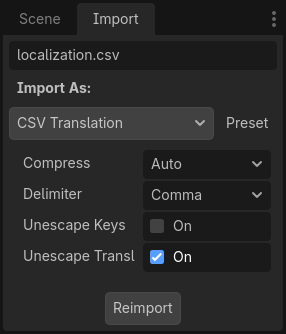
Be sure to click after any change to these options.
Loading the CSV file as a translation
Once a CSV file is imported, it is not automatically registered as a translation source for the project. Remember to follow the steps described in 配置导入的译文 so that the translation is actually used when running the project.