部署到 Android
场景布置
多数独立头显运行在 Android 上,并且 OpenXR 支持正在逐步推广到这些平台。
在遵循此处的 OpenXR 特定说明之前,你需要首先设置你的系统以导出到 Android 平台,包括:
安装 OpenJDK 17
安装 Android Studio
Configuring the location of the Android SDK in Godot
详情请参见 为 Android 导出 ,完成所需配置后再返回此处。
警告
虽然 Vulkan 渲染器针对移动设备进行了优化,但目前我们仍在解决适配问题。就现在而言,强烈建议开发者在针对基于 Android 的 XR 设备时使用兼容性渲染器(OpenGL)。
Gradle Android 构建
备注
最初,官方对 Android 平台的支持并未添加到 OpenXR 规范中,这导致各大供应商都创建了自定义加载器以在其头戴设备上实现 OpenXR。尽管从长远角度来看,所有供应商都终将转移到官方的 OpenXR 加载器;但就当下来说,这些加载器需要添加到你的项目中。
为了将特定供应商的 OpenXR 加载器包含到你的项目中,你需要先设置一个 Gradle Android 构建。
在项目菜单中选择安装 Android 构建模板...:
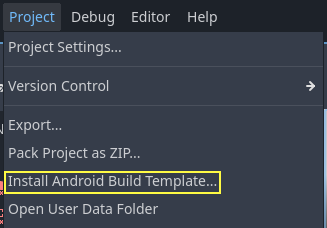
这将在你的项目中创建一个名为 android 的文件夹,包含在 Android 上运行所需的所有运行时文件。现在你可以自定义这个安装,Godot 不会在编辑器中显示这个文件夹,但你可以通过文件浏览器找到它。
你可以在这里阅读更多关于 Gradle 构建的信息:Android 的 Gradle 构建。
安装供应商插件
The vendors plugin can be downloaded from the asset library, search for "OpenXR vendors" and install the one named "Godot OpenXR Vendors plugin v4".
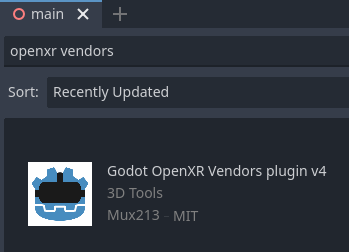
You will find the installed files inside the addons folder. Alternatively you can manually install the vendors plugin by downloading it from the release page here. You will need to copy the assets/addons/godotopenxrvendors folder from the zip file into your projects addons folder.
你可以在 这里 找到 vendors 插件的主仓库。
备注
From Godot 4.6 onwards, the vendor plugin is now an optional but recommended plugin. Godot can export directly to most Android-compatible devices. This can be useful for demonstration and tutorial projects where a single APK can be deployed to multiple devices. The vendor plugin unlocks vendor specific implementations and settings, and may be required to release on app stores.
创建导出预设
不同的设备有不同的加载器,因此你需要为每个设备分别准备导出预设。
Open Project and select Export... Click on Add.. and select Android. Next change the name of the export preset for the device you're setting this up for, say Meta Quest. And enable Use Gradle Build. Next change the XR Mode to OpenXR. If you want to use one-click deploy (described below), ensure that Runnable is enabled.
If you've installed the vendor plugin you will also find entries for the different headsets under XR Features. Select the entry for your headset, if you see one. Otherwise, enable the Khronos plugin.
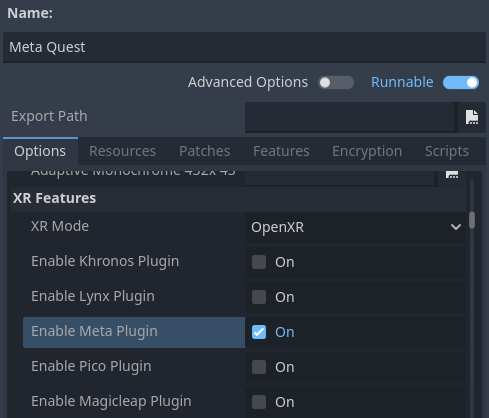
Scroll to the bottom of the list and you'll find additional XR feature sections, currently only Meta XR Features, Pico XR Features, Magicleap XR Features and Khronos XR Features for HTC are available. You will need to select the appropriate settings if you wish to use these features.
通过 Godot 编辑器在设备上运行
如果按照上述说明设置导出预设,且头戴设备已连接到电脑并被正确识别,你可以通过一键部署直接从 Godot 编辑器启动它:
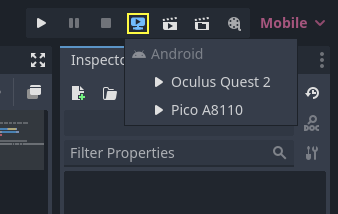
正确识别某些平台上的某些设备,可能需要执行额外步骤,请务必查阅头显设备供应商的开发者文档。
例如,对于 Meta Quest 2,你需要在头戴设备上启用开发者模式,并且如果你在 Windows 上开发,还需安装特定 ADB 驱动程序。更多详细信息,请参阅官方 Meta Quest 开发者文档。
如果你在一键部署方面遇到了问题,可参考一键部署的故障排除。