伪本地化
前言
在创建游戏时,本地化过程通常在开发完成后开始。这意味着在开发过程中无法使用翻译来测试项目是否正确国际化。
Godot 提供伪本地化作为测试项目在区域设置变更时的稳健性的一种方法。伪本地化模拟了本地化期间可能发生的更改。这样,任何有关国际化的问题都可以在开发早期就被识别出来。
参见
你可以使用伪本地化演示项目来查看伪本地化的实际工作原理。
伪本地化的启用和配置
Enabling pseudolocalization and the configurations related to it is as simple as toggling a checkbox in the project settings. These settings can be found in after enabling the toggle in the project settings dialog:
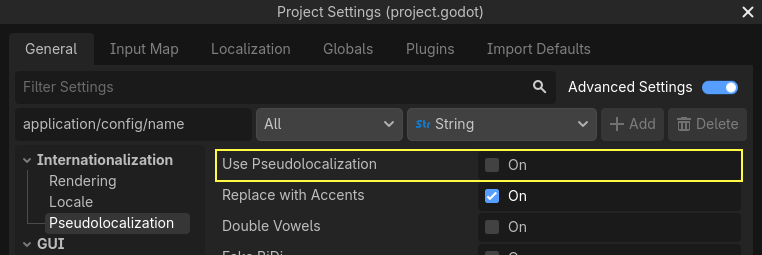
伪本地化也可以在运行时通过脚本切换。
伪本地化配置
Godot 中的伪本地化可以根据项目的具体用例进行设置。以下是可以通过项目设置配置的伪本地化属性:
replace_with_accents:将字符串中的所有字符替换为对应的重音变体。 启用该设置后,"The quick brown fox jumped over the lazy dog" 会被转换为 "Ŧh̀é q́üíćḱ ḅŕôŵή f́ôx́ ǰüm̀ṕéd́ ôṽéŕ ŧh̀é łáźý d́ôǵ"。可以用来发现没有重音的未翻译字符串,也适用于检查项目使用的字体是否缺失字形。double_vowels:将字符串中的所有元音加倍。这是在本地化过程中模拟文本扩充的一个很好的近似方法。这可用于检查会溢出其容器的文本(例如按钮)。fake_bidi:假双向文字(模拟从右到左的文字)。这对于模拟从右到左的书写系统非常有用,以检查使用从右到左脚本的语言中可能出现的潜在布局问题。override:用星号(*)替换字符串中的所有字符。这对于快速查找未本地化的文本很有用。expansion_ratio:可用于将元音加倍不足以近似的情况。该设置用下划线(_)填充字符串,并按给定比率扩展它。对于大多数实际情况来说,扩展比率为0.3就足够了;它将使字符串的长度增加 30%。prefix和suffix:这些属性可用于指定包装文本的前缀和后缀。skip_placeholders:跳过字符串格式化的占位符,如%s和%f。这对于识别需要更多参数才能正确显示格式化字符串的位置很有用。
所有这些属性都可以根据项目的用例按需进行切换。
运行时配置伪本地化
Pseudolocalization can be toggled at runtime using the
pseudolocalization_enabled property
in TranslationServer.
However, if runtime configuration of pseudolocalization properties is required,
they can be directly configured using
ProjectSettings.set_setting(property, value)
and then calling
TranslationServer.reload_pseudolocalization()
which reparses the pseudolocalization properties and reloads the pseudolocalization.
The following code snippet shall turn on replace_with_accents and double_vowels properties
and then call reload_pseudolocalization() for the changes to get reflected:
ProjectSettings.set_setting("internationalization/pseudolocalization/replace_with_accents", true)
ProjectSettings.set_setting("internationalization/pseudolocalization/double_vowels", true)
TranslationServer.reload_pseudolocalization()