Vector2
使用浮点数坐标的 2D 向量。
描述
包含两个元素的结构体,可用于代表 2D 坐标或任何数值的二元组。
使用浮点数坐标。默认情况下,这些浮点值为 32 位精度,与始终为 64 位的 float 并不相同。如果需要双精度,请在编译引擎时使用 precision=double 选项。
对应的整数版本见 Vector2i。
注意:在布尔语境中,如果 Vector2 等于 Vector2(0, 0) 则求值结果为 false。否则 Vector2 的求值结果始终为 true。
教程
属性
|
||
|
构造函数
Vector2() |
|
方法
abs() const |
|
angle() const |
|
angle_to_point(to: Vector2) const |
|
aspect() const |
|
bezier_derivative(control_1: Vector2, control_2: Vector2, end: Vector2, t: float) const |
|
bezier_interpolate(control_1: Vector2, control_2: Vector2, end: Vector2, t: float) const |
|
ceil() const |
|
cubic_interpolate(b: Vector2, pre_a: Vector2, post_b: Vector2, weight: float) const |
|
cubic_interpolate_in_time(b: Vector2, pre_a: Vector2, post_b: Vector2, weight: float, b_t: float, pre_a_t: float, post_b_t: float) const |
|
direction_to(to: Vector2) const |
|
distance_squared_to(to: Vector2) const |
|
distance_to(to: Vector2) const |
|
floor() const |
|
from_angle(angle: float) static |
|
is_equal_approx(to: Vector2) const |
|
is_finite() const |
|
is_normalized() const |
|
is_zero_approx() const |
|
length() const |
|
length_squared() const |
|
limit_length(length: float = 1.0) const |
|
max_axis_index() const |
|
min_axis_index() const |
|
move_toward(to: Vector2, delta: float) const |
|
normalized() const |
|
orthogonal() const |
|
round() const |
|
sign() const |
|
运算符
operator !=(right: Vector2) |
|
operator *(right: Transform2D) |
|
operator *(right: Vector2) |
|
operator *(right: float) |
|
operator *(right: int) |
|
operator +(right: Vector2) |
|
operator -(right: Vector2) |
|
operator /(right: Vector2) |
|
operator /(right: float) |
|
operator /(right: int) |
|
operator <(right: Vector2) |
|
operator <=(right: Vector2) |
|
operator ==(right: Vector2) |
|
operator >(right: Vector2) |
|
operator >=(right: Vector2) |
|
operator [](index: int) |
|
枚举
enum Axis: 🔗
Axis AXIS_X = 0
X 轴的枚举值。由 max_axis_index() 和 min_axis_index() 返回。
Axis AXIS_Y = 1
Y 轴的枚举值。由 max_axis_index() 和 min_axis_index() 返回。
常量
ZERO = Vector2(0, 0) 🔗
零向量,所有分量都设置为 0 的向量。
ONE = Vector2(1, 1) 🔗
一向量,所有分量都设置为 1 的向量。
INF = Vector2(inf, inf) 🔗
无穷大向量,所有分量都设置为 @GDScript.INF 的向量。
LEFT = Vector2(-1, 0) 🔗
左单位向量。代表左的方向。
RIGHT = Vector2(1, 0) 🔗
右单位向量。代表右的方向。
UP = Vector2(0, -1) 🔗
上单位向量。在 2D 中 Y 是向下的,所以这个向量指向 -Y。
DOWN = Vector2(0, 1) 🔗
下单位向量。在 2D 中 Y 是向下的,所以这个向量指向 +Y。
属性说明
向量的 X 分量。也可以通过使用索引位置 [0] 访问。
向量的 Y 分量。也可以通过使用索引位置 [1] 访问。
构造函数说明
构造默认初始化的 Vector2,所有分量均为 0。
Vector2 Vector2(from: Vector2)
构造给定 Vector2 的副本。
Vector2 Vector2(from: Vector2i)
从 Vector2i 构造新的 Vector2。
Vector2 Vector2(x: float, y: float)
从给定的 x 和 y 构造新的 Vector2。
方法说明
返回一个新向量,其所有分量都是绝对值,即正值。
返回该向量与 X 轴正方向,即 (1, 0),的夹角,单位为弧度。
例如,Vector2.RIGHT.angle() 将返回零,Vector2.DOWN.angle() 将返回 PI / 2(四分之一圈,即 90 度),而 Vector2(1, -1).angle() 将返回 -PI / 4(负八分之一圈,即 -45 度)。
这等同于传递 y 和 x 调用 @GlobalScope.atan2()。
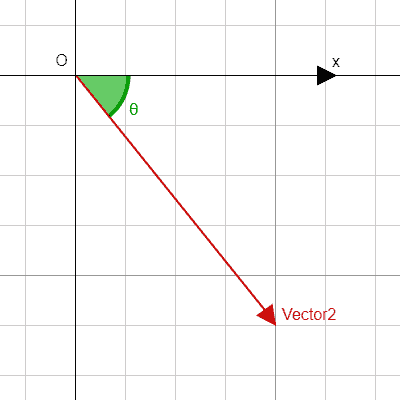
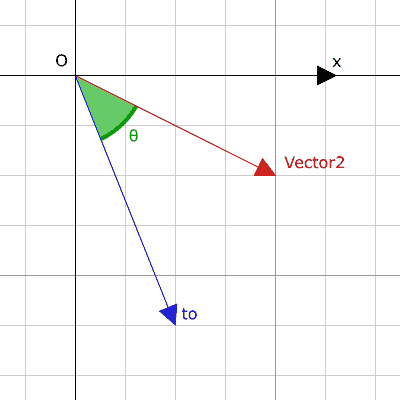
float angle_to(to: Vector2) const 🔗
Returns the signed angle to the given vector, in radians. The result ranges from -PI to PI (inclusive).
Illustration of the returned angle.
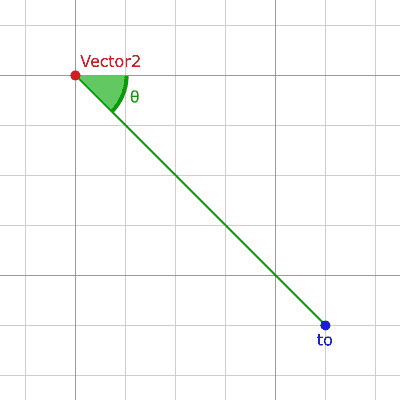
float angle_to_point(to: Vector2) const 🔗
Returns the signed angle between the X axis and the line from this vector to point to, in radians. The result ranges from -PI to PI (inclusive).
a.angle_to_point(b) is equivalent to (b - a).angle(). See also angle().
Illustration of the returned angle.
Returns this vector's aspect ratio, which is x divided by y.
Vector2 bezier_derivative(control_1: Vector2, control_2: Vector2, end: Vector2, t: float) const 🔗
返回贝赛尔曲线上 t 处的导数,该曲线由此向量和控制点 control_1、control_2、终点 end 定义。
Vector2 bezier_interpolate(control_1: Vector2, control_2: Vector2, end: Vector2, t: float) const 🔗
返回贝赛尔曲线上 t 处的点,该曲线由此向量和控制点 control_1、control_2、终点 end 定义。
Vector2 bounce(n: Vector2) const 🔗
返回从由给定垂直法线 n 定义的线“反弹”的向量。
注意: bounce() 执行大多数引擎和框架调用 reflect() 的操作。
返回一个新向量,所有的分量都是向上舍入(正无穷大方向)。
Vector2 clamp(min: Vector2, max: Vector2) const 🔗
返回一个新向量,每个分量都使用 @GlobalScope.clamp() 限制在 min 和 max 之间。
Vector2 clampf(min: float, max: float) const 🔗
返回一个新向量,每个分量都使用 @GlobalScope.clamp() 限制在 min 和 max 之间。
float cross(with: Vector2) const 🔗
返回该向量和 with 的 2D 类比叉积。
这是由两个向量所形成的平行四边形的有符号面积。如果第二个向量是从第一个向量的顺时针方向出发的,则叉积为正面积。如果是逆时针方向,则叉积为负面积。如果两个向量平行,则返回零,这对于测试两个向量是否平行很有用。
注意:数学中没有定义二维空间的叉乘。此方法是将 2D 向量嵌入到 3D 空间的 XY 平面中,并使用它们的叉积的 Z 分量作为类比。
Vector2 cubic_interpolate(b: Vector2, pre_a: Vector2, post_b: Vector2, weight: float) const 🔗
返回该向量和 b 之间进行三次插值 weight 处的结果,使用 pre_a 和 post_b 作为控制柄。weight 在 0.0 到 1.0 的范围内,代表插值的量。
Vector2 cubic_interpolate_in_time(b: Vector2, pre_a: Vector2, post_b: Vector2, weight: float, b_t: float, pre_a_t: float, post_b_t: float) const 🔗
返回该向量和 b 之间进行三次插值 weight 处的结果,使用 pre_a 和 post_b 作为控制柄。weight 在 0.0 到 1.0 的范围内,代表插值的量。
通过使用时间值,可以比 cubic_interpolate() 进行更平滑的插值。
Vector2 direction_to(to: Vector2) const 🔗
Returns the normalized vector pointing from this vector to to.
a.direction_to(b) is equivalent to (b - a).normalized(). See also normalized().
float distance_squared_to(to: Vector2) const 🔗
返回该向量与 to 之间的距离的平方。
该方法比 distance_to() 运行得更快,因此请在需要比较向量或者用于某些公式的平方距离时,优先使用这个方法。
float distance_to(to: Vector2) const 🔗
返回该向量与 to 之间的距离。
float dot(with: Vector2) const 🔗
返回该向量与 with 的点积。可用于比较两个向量之间的夹角。例如,可用于确定敌人是否面向玩家。
直角(90 度)的点积为 0;大于 0 则夹角小于 90 度;小于 0 则夹角大于 90 度。
使用(归一化的)单位向量时,如果向量朝向相反,则结果始终为 -1.0(180 度角);如果向量方向一致,则结果始终为 1.0(0 度角)。
注意:a.dot(b) 等价于 b.dot(a)。
返回一个新的向量,所有的向量都被四舍五入,向负无穷大。
Vector2 from_angle(angle: float) static 🔗
创建旋转至 angle 角度的 Vector2,旋转单位为弧度。相当于执行 Vector2(cos(angle), sin(angle)) 或 Vector2.RIGHT.rotated(angle)。
print(Vector2.from_angle(0)) # 输出 (1.0, 0.0)
print(Vector2(1, 0).angle()) # 输出 0.0,即上一行所使用的角度。
print(Vector2.from_angle(PI / 2)) # 输出 (0.0, 1.0)
注意:返回的 Vector2 的长度约等于 1.0,由于浮点数精度问题,不保证精确等于 1.0。如果需要单位向量,请调用返回的 Vector2 的 normalized()。
bool is_equal_approx(to: Vector2) const 🔗
如果这个向量与 to 大致相等,则返回 true,判断方法是对每个分量执行 @GlobalScope.is_equal_approx()。
如果该向量无穷,则返回 true,判断方法是对每个分量调用 @GlobalScope.is_finite()。
如果该向量是归一化的,即长度约等于 1,则返回 true。
如果该向量的值大约为零,则返回 true,判断方法是对每个分量运行 @GlobalScope.is_zero_approx()。
该方法比使用 is_equal_approx() 和零向量比较要快。
返回这个向量的长度,即大小。
float length_squared() const 🔗
返回这个向量的平方长度,即平方大小。
这个方法比 length() 运行得更快,所以如果你需要比较向量或需要一些公式的平方距离时,更喜欢用它。
Vector2 lerp(to: Vector2, weight: float) const 🔗
返回此向量和 to 之间,按数量 weight 线性插值结果。weight 在 0.0 到 1.0 的范围内,代表插值的量。
Vector2 limit_length(length: float = 1.0) const 🔗
返回应用了最大长度限制的向量,长度被限制到 length。如果向量非有限,则结果未定义。
Vector2 max(with: Vector2) const 🔗
返回自身与 with 各分量的最大值,等价于 Vector2(maxf(x, with.x), maxf(y, with.y))。
返回该向量中最大值的轴。见 AXIS_* 常量。如果所有分量相等,则该方法返回 AXIS_X。
Vector2 maxf(with: float) const 🔗
返回自身与 with 各分量的最大值,等价于 Vector2(maxf(x, with), maxf(y, with))。
Vector2 min(with: Vector2) const 🔗
返回自身与 with 各分量的最小值,等价于 Vector2(minf(x, with.x), minf(y, with.y))。
返回该向量中最小值的轴。见 AXIS_* 常量。如果所有分量相等,则该方法返回 AXIS_Y。
Vector2 minf(with: float) const 🔗
返回自身与 with 各分量的最小值,等价于 Vector2(minf(x, with), minf(y, with))。
Vector2 move_toward(to: Vector2, delta: float) const 🔗
返回一个新向量,该向量朝 to 移动了固定的量 delta。不会超过最终值。
返回该向量缩放至单位长度的结果。等价于 v / v.length()。如果 v.length() == 0 则返回 (0, 0)。另见 is_normalized()。
注意:如果输入向量的长度接近零,则这个函数可能返回不正确的值。
返回一个与原来相比逆时针旋转 90 度的垂直向量,长度不变。
Vector2 posmod(mod: float) const 🔗
返回由该向量的分量与 mod 执行 @GlobalScope.fposmod() 运算后组成的向量。
Vector2 posmodv(modv: Vector2) const 🔗
返回由该向量的分量与 modv 的分量执行 @GlobalScope.fposmod() 运算后组成的向量。
Vector2 project(b: Vector2) const 🔗
返回将该向量投影到给定的 b 向量上所得到的新向量。得到的新向量与 b 平行。另见 slide()。
注意:如果 b 向量为零向量,得到的新向量的分量均为 @GDScript.NAN。
Vector2 reflect(line: Vector2) const 🔗
返回从给定方向向量 line 定义的线反射向量的结果。
注意:reflect() 与其他引擎和框架调用的 reflect() 不同。在其他引擎中,reflect() 采用法线方向,即垂直于线的方向。在 Godot 中,你可以直接指定线的方向。另见 bounce(),它执行大多数引擎调用的 reflect()。
Vector2 rotated(angle: float) const 🔗
返回将这个向量旋转 angle 的结果(单位为弧度)。另见 @GlobalScope.deg_to_rad()。
返回所有分量都被四舍五入为最接近的整数的向量,中间情况向远离零的方向舍入。
返回新的向量,分量如果为正则设为 1.0,如果为负则设为 -1.0,如果为零则设为 0.0。结果与对每个分量调用 @GlobalScope.sign() 一致。
Vector2 slerp(to: Vector2, weight: float) const 🔗
返回在这个向量和 to 之间进行 weight 的球面线性插值的结果。weight 在 0.0 和 1.0 的范围内,代表插值的量。
如果输入向量的长度不同,这个函数也会对长度进行插值处理。对于输入向量中存在长度为零的向量的特殊情况,这个方法的行为与 lerp() 一致。
Vector2 slide(n: Vector2) const 🔗
返回将该向量沿着法线为 n 的直线滑动所得到的新向量。得到的新向量与 n 垂直,等价于将该向量减去在 n 上的投影。另见 project()。
注意:向量 n 必须为归一化的向量。另见 normalized()。
Vector2 snapped(step: Vector2) const 🔗
返回新的向量,每个分量都吸附到了与 step 中对应分量最接近的倍数。也可以用于将分量四舍五入至小数点后的任意位置。
Vector2 snappedf(step: float) const 🔗
返回一个新向量,其中每个分量都吸附到 step 的最接近的倍数。这也可以用于将分量四舍五入为任意数位的小数。
运算符说明
bool operator !=(right: Vector2) 🔗
如果向量不相等,则返回 true。
注意:由于浮点数精度误差,请考虑改用 is_equal_approx(),会更可靠。
注意:包含 @GDScript.NAN 元素的向量的行为与其他向量不同。因此,如果包含 NaN,则这个方法的结果可能不准确。
Vector2 operator *(right: Transform2D) 🔗
假设该变换的基是正交的(即旋转/反射可以,缩放/倾斜不行),将 Vector2 逆向变换(乘以)给定的 Transform2D 变换矩阵。
vector * transform 相当于 transform.inverse() * vector。请参阅 Transform2D.inverse()。
对于通过仿射变换的逆进行的变换(例如缩放),可以使用 transform.affine_inverse() * vector 代替。请参阅 Transform2D.affine_inverse()。
Vector2 operator *(right: Vector2) 🔗
将该 Vector2 的每个分量乘以给定 Vector2 的对应分量。
print(Vector2(10, 20) * Vector2(3, 4)) # 输出 (30.0, 80.0)
Vector2 operator *(right: float) 🔗
将该 Vector2 的每个分量乘以给定的 float。
Vector2 operator *(right: int) 🔗
将该 Vector2 的每个分量乘以给定的 int。
Vector2 operator +(right: Vector2) 🔗
将该 Vector2 的每个分量加上给定 Vector2 的对应分量。
print(Vector2(10, 20) + Vector2(3, 4)) # 输出 (13.0, 24.0)
Vector2 operator -(right: Vector2) 🔗
将该 Vector2 的每个分量减去给定 Vector2 的对应分量。
print(Vector2(10, 20) - Vector2(3, 4)) # 输出 (7.0, 16.0)
Vector2 operator /(right: Vector2) 🔗
将该 Vector2 的每个分量除以给定 Vector2 的对应分量。
print(Vector2(10, 20) / Vector2(2, 5)) # 输出 (5.0, 4.0)
Vector2 operator /(right: float) 🔗
将该 Vector2 的每个分量除以给定的 float。
Vector2 operator /(right: int) 🔗
将该 Vector2 的每个分量除以给定的 int。
bool operator <(right: Vector2) 🔗
比较两个 Vector2 向量,首先检查左向量的 X 值是否小于 right 向量的 X 值。如果 X 值完全相等,则用相同的方法检查两个向量的 Y 值。该运算符可用于向量排序。
注意:包含 @GDScript.NAN 元素的向量的行为与其他向量不同。因此,如果包含 NaN,则这个方法的结果可能不准确。
bool operator <=(right: Vector2) 🔗
比较两个 Vector2 向量,首先检查左向量的 X 值是否小于等于 right 向量的 X 值。如果 X 值完全相等,则用相同的方法检查两个向量的 Y 值。该运算符可用于向量排序。
注意:包含 @GDScript.NAN 元素的向量的行为与其他向量不同。因此,如果包含 NaN,则这个方法的结果可能不准确。
bool operator ==(right: Vector2) 🔗
如果向量完全相等,则返回 true。
注意:由于浮点数精度误差,请考虑改用 is_equal_approx(),会更可靠。
注意:包含 @GDScript.NAN 元素的向量的行为与其他向量不同。因此,如果包含 NaN,则这个方法的结果可能不准确。
bool operator >(right: Vector2) 🔗
比较两个 Vector2 向量,首先检查左向量的 X 值是否大于 right 向量的 X 值。如果 X 值完全相等,则用相同的方法检查两个向量的 Y 值。该运算符可用于向量排序。
注意:包含 @GDScript.NAN 元素的向量的行为与其他向量不同。因此,如果包含 NaN,则这个方法的结果可能不准确。
bool operator >=(right: Vector2) 🔗
比较两个 Vector2 向量,首先检查左向量的 X 值是否大于等于 right 向量的 X 值。如果 X 值完全相等,则用相同的方法检查两个向量的 Y 值。该运算符可用于向量排序。
注意:包含 @GDScript.NAN 元素的向量的行为与其他向量不同。因此,如果包含 NaN,则这个方法的结果可能不准确。
float operator [](index: int) 🔗
使用向量分量的 index 来访问向量分量。v[0] 等价于 v.x、v[1] 等价于 v.y。
返回与 + 不存在时相同的值。单目 + 没有作用,但有时可以使你的代码更具可读性。
返回该 Vector2 的负值。和写 Vector2(-v.x, -v.y) 是一样的。该操作在保持相同幅度的同时,翻转向量的方向。对于浮点数,零也有正负两种。